E Invoicing
E-invoicing is the practice of sending invoices as structured, machine-readable documents rather than PDFs or paper — so your customer's accounting system can ingest them directly without anyone retyping figures. Adoption is accelerating: many jurisdictions have moved, or are moving, to mandate it for B2B and B2G transactions, and the EU has signalled that all member states will be on a standard PEPPOL network implementation by 2030.
Invoice Ninja has supported UBL-format invoices for some time, and now covers a range of e-invoice formats along with direct delivery over the PEPPOL network. Every supported standard can be downloaded straight from a regular invoice you create in Invoice Ninja — so enabling e-invoicing doesn't change how you invoice day-to-day, it only changes the shape of the document that goes out.
In some regions the invoice travels directly from you to your customer. In others — Italy is the obvious example — it has to be routed through a government clearinghouse (SDI in Italy's case), which then forwards it to the customer. If you're in one of those jurisdictions, both parties need to be registered with the relevant body, and you'll need to start the process of obtaining a government routing ID if you haven't already.
E-Invoice Standards
The list of supported formats is:
- PEPPOL (Universal - Cross industry / border)
- ZUGFeRD - XRechung (Germany)
- Facturae (Spain)
- Verifactu (Spain)
- FatturaPA (Italy)
- FACT1 (Romania)
- EN16931 (Generic)
PEPPOL
PEPPOL is the closest thing to a universal e-invoicing standard — a cross-border network that lets businesses in participating countries exchange invoices without bilateral integrations. Invoice Ninja operates its own PEPPOL access point, available to both hosted and self-hosted users, which routes your e-invoices onto the network.
Getting Started
Each jurisdiction has its own set of fields that must be populated for an e-invoice to validate. In Germany, for example, a Payment Means field is required — that's the sending party's payment details such as the IBAN and related bank metadata. Without it the e-invoice cannot be generated or sent. During onboarding you'll have the chance to validate your data so nothing blocks delivery later.
If you're on our hosted platform we'll send you region-specific onboarding instructions. Self-hosted users proxy their e-invoices through our hosted platform: you register your service with Invoice Ninja, we create a legal entity ID for you, and your system then routes e-invoices through ours. For security and data privacy, the proxy only relays the data that is sent — it's never stored on our side.
Preparing Your Installation
A few things are worth knowing before you flip e-invoicing on, because they change how you build and handle invoices going forward:
- All taxes must be applied at the line level. Invoice-level (total) taxes are not supported with e-invoicing. See Line-Level vs Invoice-Level Tax for the reasoning behind the two modes.
- If you don't charge VAT or tax on your invoices, you still need to apply a tax code or reason — for example, Cross Border exemption, or seller with no VAT number. The e-invoice schema requires an explicit answer to "why no tax?" rather than silence.
- Once an invoice has been sent it can never be modified. If something needs to change, create a new invoice or credit with the correction. This is a compliance rule, not a UI limitation — a sent e-invoice is effectively a legal document in transit.
- To correct or reduce a sent PEPPOL invoice, you can create either a dedicated credit note or a negative invoice. Both are supported. See Correcting a Sent PEPPOL Invoice below.
Correcting a Sent PEPPOL Invoice
You can correct a sent PEPPOL invoice in either of these ways:
Create a Credit Note
This is the simplest option when you are crediting an existing invoice:
- Open the original invoice.
- Open its Actions menu and select Credit Note.
- Review the new credit. The client, line items, and original invoice reference are filled in for you.
- Save the credit, then open its E-Invoice tab.
- Check that the original invoice is shown under Reference and resolve any validation messages.
- Select Send.
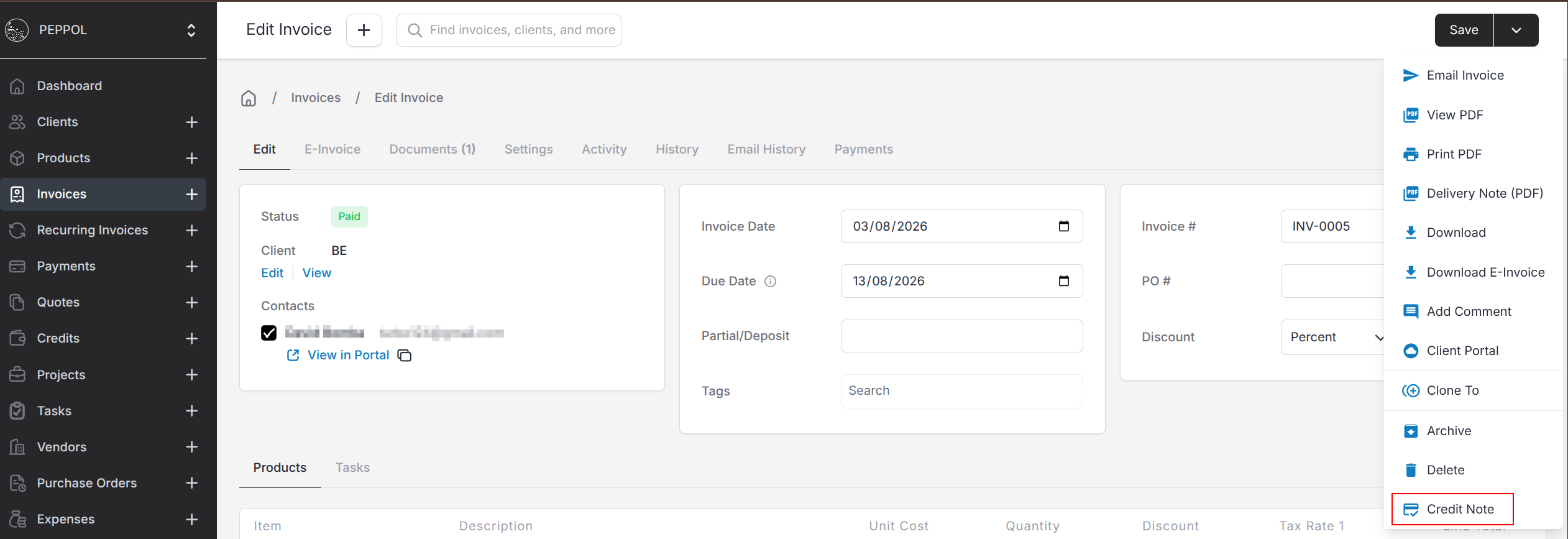
Create a Negative Invoice
A negative invoice remains valid for PEPPOL and is sent as a credit note. Create a new invoice for the amount you need to reverse, using a negative Quantity and a positive Unit Price so the invoice total is negative.
Always enter a positive Unit Price on PEPPOL invoices and credits.
- For a negative invoice, use a negative Quantity with a positive Unit Price.
- For a dedicated credit, use positive quantities and positive unit prices. The credit itself represents the reduction.
A negative unit price will prevent the PEPPOL document from validating.
Can I receive e-invoices?
Yes. On our hosted platform this is automatic. Self-hosted users receive inbound e-invoices via a cron that polls Invoice Ninja servers every four hours.
Getting Started Checklist
Supported Countries
The countries currently supported for PEPPOL delivery are:
- Austria
- Belgium
- Denmark
- Germany
- Iceland
- Ireland
- Luxembourg
- Netherlands
- Norway
- Sweden
- Andorra
- Australia
- Bulgaria
- Switzerland
- Cyprus
- Czech Republic
- Estonia
- Spain
- Finland
- France
- United Kingdom
- Greece
- Croatia
- Hungary
- Italy
- Japan
- Liechtenstein
- Lithuania
- Latvia
- Malaysia
- New Zealand
- Poland
- Portugal
- Romania
- Singapore
- Slovenia
- Slovakia
- United States
Hosted Users
- Register with your government body if e-invoices are to be routed via a government portal.
- Enable e-invoicing at Settings > E Invoice, and select PEPPOL as the e-invoice type.
- Ensure your company details pass validation at Settings > E-Invoicing - Validation.
- Generate and send e-invoices.
Self Hosted Users
- Register with your government body if e-invoices are to be routed via a government portal.
- Register your entity with Invoice Ninja.
- Ensure your company details pass validation at Settings > E-Invoicing - Validation.
- Enable e-invoicing at Settings > E Invoice, and select PEPPOL as the e-invoice type.
- Generate and send e-invoices.
Code lists / values
For e-invoicing there are several mandatory fields, one of them is the Payment Means. This is your preferred means of being paid by your client, for EU users, select Credit Transfer (code 30). This will allow you to enter your IBAN and BIC.
The full list of available means is listed below:
Payment Means Codelist
1 - Instrument not defined
2 - Automated clearing house credit
3 - Automated clearing house debit
4 - ACH demand debit reversal
5 - ACH demand credit reversal
6 - ACH demand credit
7 - ACH demand debit
8 - Hold
9 - National or regional clearing
10 - In cash
11 - ACH savings credit reversal
12 - ACH savings debit reversal
13 - ACH savings credit
14 - ACH savings debit
15 - Bookentry credit
16 - Bookentry debit
17 - ACH demand cash concentration/disbursement (CCD) credit
18 - ACH demand cash concentration/disbursement (CCD) debit
19 - ACH demand corporate trade payment (CTP) credit
20 - Cheque
21 - Banker's draft
22 - Certified banker's draft
23 - Bank cheque (issued by a banking or similar establishment)
24 - Bill of exchange awaiting acceptance
25 - Certified cheque
26 - Local cheque
27 - ACH demand corporate trade payment (CTP) debit
28 - ACH demand corporate trade exchange (CTX) credit
29 - ACH demand corporate trade exchange (CTX) debit
30 - Credit transfer
31 - Debit transfer
32 - ACH demand cash concentration/disbursement plus (CCD+) credit
33 - ACH demand cash concentration/disbursement plus (CCD+) debit
34 - ACH prearranged payment and deposit (PPD)
35 - ACH savings cash concentration/disbursement (CCD) credit
36 - ACH savings cash concentration/disbursement (CCD) debit
37 - ACH savings corporate trade payment (CTP) credit
38 - ACH savings corporate trade payment (CTP) debit
39 - ACH savings corporate trade exchange (CTX) credit
40 - ACH savings corporate trade exchange (CTX) debit
41 - ACH savings cash concentration/disbursement plus (CCD+) credit
42 - Payment to bank account
43 - ACH savings cash concentration/disbursement plus (CCD+) debit
44 - Accepted bill of exchange
45 - Referenced home-banking credit transfer
46 - Interbank debit transfer
47 - Home-banking debit transfer
48 - Bank card
49 - Direct debit
50 - Payment by postgiro
51 - FR, norme 6 97-Telereglement CFONB (French Organisation for Banking Standards) - Option A
52 - Urgent commercial payment
53 - Urgent Treasury Payment
60 - Promissory note
61 - Promissory note signed by the debtor
62 - Promissory note signed by the debtor and endorsed by a bank
63 - Promissory note signed by the debtor and endorsed by a third party
64 - Promissory note signed by a bank
65 - Promissory note signed by a bank and endorsed by another bank
66 - Promissory note signed by a third party
67 - Promissory note signed by a third party and endorsed by a bank
70 - Bill drawn by the creditor on the debtor
74 - Bill drawn by the creditor on a bank
75 - Bill drawn by the creditor, endorsed by another bank
76 - Bill drawn by the creditor on a bank and endorsed by a third party
77 - Bill drawn by the creditor on a third party
78 - Bill drawn by creditor on third party, accepted and endorsed by bank
91 - Not transferable banker's draft
92 - Not transferable local cheque
93 - Reference giro
94 - Urgent giro
95 - Free format giro
96 - Requested method for payment was not used
97 - Clearing between partners
ZZZ - Mutually defined
Jurisdiction Specific Requirements
Every PEPPOL country layers a few of its own rules on top of the standard. The sections below cover what each one expects in addition to the baseline fields.
AT - Austria
CustomerAssignedAccountID - Mandatory for GOV clients
When you're billing a government body in Austria, the e-invoice has to include:
AccountingSupplierParty > CustomerAssignedAccountID
This is the ID of the department within the government that the e-invoice will be routed to — without it the system has no way to direct the document internally.
BE - Belgium
No additional requirements. When your legal entity ID is created it is automatically synced with HERMES.
CH - Switzerland
Payment Means - Mandatory
The payment means tells the recipient how you'd like to be paid. Using the Payment Means codelist, you must include at least ONE payment means of the Credit Transfer type.
   <cac:PaymentMeans>
      <cbc:PaymentMeansCode>30</cbc:PaymentMeansCode> <!-- code from payment means code list Credit Transfer-->
      <cac:PayeeFinancialAccount>
         <cbc:ID>DE89370400440532013000</cbc:ID> <!-- IBAN CODE -->
         <cac:FinancialInstitutionBranch>
            <cbc:ID>DEUTDEMMXXX</cbc:ID> <!-- BIC CODE -->
         </cac:FinancialInstitutionBranch>
      </cac:PayeeFinancialAccount>
   </cac:PaymentMeans>
DE - Germany
Payment Means - Mandatory
The payment means contains information on how the seller wishes to be paid. Consult the Payment Means codelist for the right code — for example, to declare a bank account for credit transfer:
   <cac:PaymentMeans>
      <cbc:PaymentMeansCode>30</cbc:PaymentMeansCode> <!-- code from payment means code list Credit Transfer-->
      <cac:PayeeFinancialAccount>
         <cbc:ID>DE89370400440532013000</cbc:ID> <!-- IBAN CODE -->
         <cac:FinancialInstitutionBranch>
            <cbc:ID>DEUTDEMMXXX</cbc:ID> <!-- BIC CODE -->
         </cac:FinancialInstitutionBranch>
      </cac:PayeeFinancialAccount>
   </cac:PaymentMeans>
ES - Spain
*** Government registration required ***
Payment Means - Mandatory
The payment means contains information on how the seller wishes to be paid. Using the Payment Means codelist, you must include at least ONE payment means of the Credit Transfer type.
   <cac:PaymentMeans>
      <cbc:PaymentMeansCode>30</cbc:PaymentMeansCode> <!-- code from payment means code list Credit Transfer-->
      <cac:PayeeFinancialAccount>
         <cbc:ID>DE89370400440532013000</cbc:ID> <!-- IBAN CODE -->
         <cac:FinancialInstitutionBranch>
            <cbc:ID>DEUTDEMMXXX</cbc:ID> <!-- BIC CODE -->
         </cac:FinancialInstitutionBranch>
      </cac:PayeeFinancialAccount>
   </cac:PaymentMeans>
Due Date - Mandatory
The invoice MUST have a due date set.
Government bound e-invoices
If sending to a Spanish government body, the property:
AccountingCustomerParty > PublicIdentifiers
must be set.
FI - Finland
Finland requires some special mapping of relevant IDs, the following client fields should be used for these:
| Field | Scheme | Example |
|---|---|---|
| Routing ID | FI:OPID (operator) | 003702554123 |
| ID Number | FI:OVT | 003703854172 |
| VAT Number | FI:VAT | FI06874602 |
FR - France
The SIRET / 0009 identifier of the final recipient must be included in the invoice.accountingCustomerParty.publicIdentifiers array.
IT - Italy
No special requirements.
NL - Netherlands
When sending to government bodies the following property must be configured:
accountingSupplierParty > party > contact > email
PL - Poland
*** Government registration required ***
RO - Romania
*** Government registration required ***
Special codes for county
The county field for a Romanian address must use the ISO3166-2:RO codes — for example, "RO-AB" or "RO-AR". Don't omit the country prefix, as validation will reject the document.
Special codes for city
For county RO-B the city field must be one of SECTOR1 through SECTOR6.
SE - Sweden
Receiver needs to be registered with Svefaktura to receive the e-invoice.
ZUGFeRD
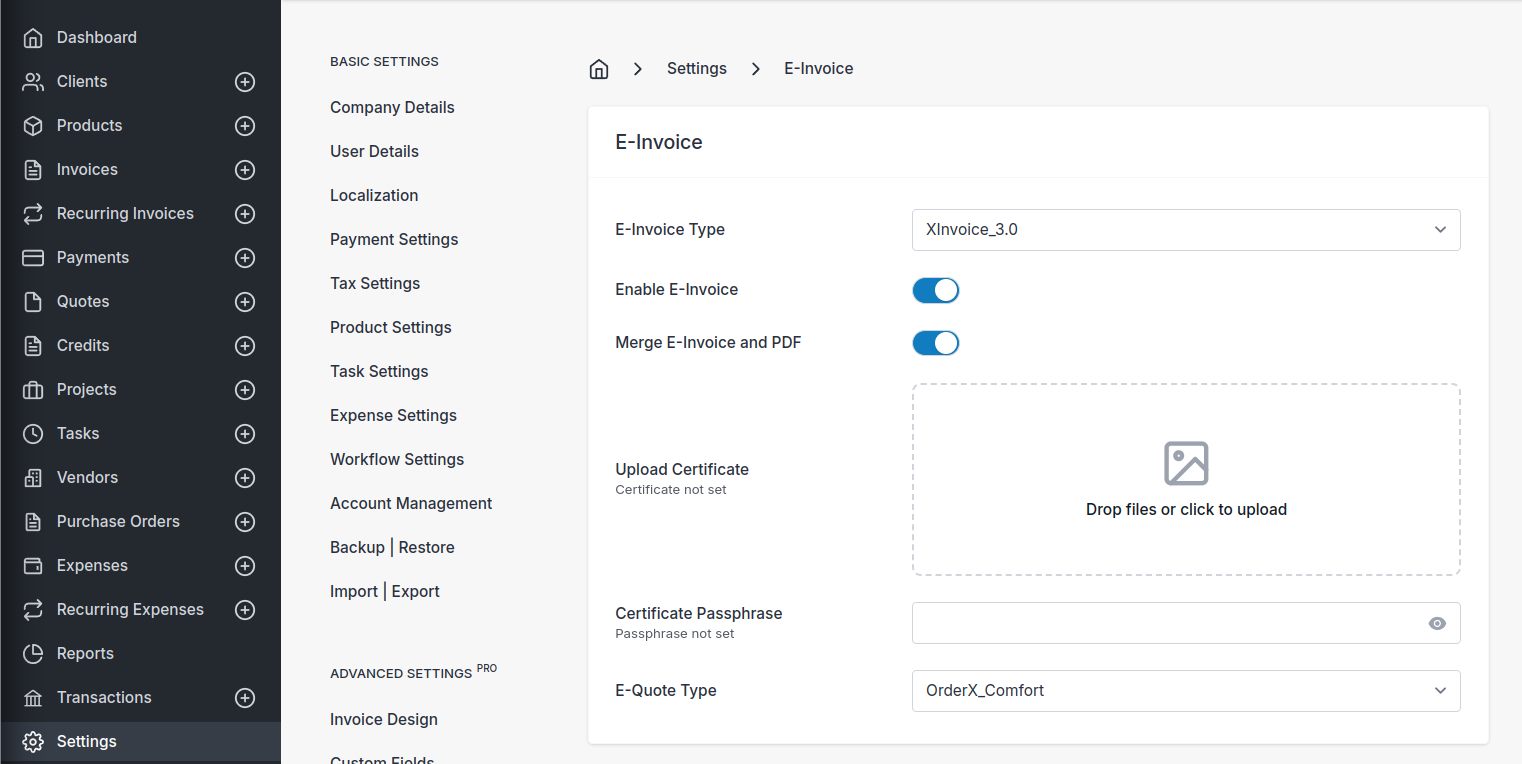
ZUGFeRD is the German hybrid format — a regular PDF with the structured e-invoice XML embedded inside it, which means a single document works for both humans and machines. Turn it on from Settings > E-Invoice, select the X format variant you need, and save. If you'd like the XML carried inside the PDF itself rather than as a separate file, toggle Merge E-Invoice and PDF before saving.
** NOTE **
ZUGFeRD does not accept negative-valued invoices. If you've historically used a negative invoice to represent a credit note, that won't work here — you'll need to create a dedicated credit note with matching positive values reflecting the credit you're assigning. See Credits for how credit notes work.
Facturae
Spanish Facturae documents are supported and generate valid output. These can be uploaded into the FACe system.
Verifactu (alpha)
Support for Verifactu is nearing release. Your day-to-day invoicing flow inside Invoice Ninja doesn't change, but there are a few important behaviours to be aware of because Verifactu is a submission-based system with stricter document lifecycle rules:
1. Power of Attorney. For Invoice Ninja to submit invoices to AEAT on your behalf, AEAT requires you to grant permission. This is done directly on the AEAT website by searching for Invoice Ninja in the list of registered providers.
2. Document submission process. Once an invoice has been submitted it cannot be modified — the document moves into a locked state. You can still cancel a submitted document using Cancel or Delete on the invoice. If you need to issue a rectification invoice (a credit note), use the Rectify menu option — this generates a negative invoice linked to the original. Rectification invoices can themselves be cancelled, which removes the credit note linked to the invoice.
NOTE
Once an invoice has a rectification invoice (credit note) applied to it, it cannot be deleted unless all attached credit notes have also been cancelled or deleted first.
3. Verifactu tab. After saving an invoice on the edit invoice page, a Verifactu tab appears with additional information about that invoice's validation status.
4. Mandatory information. For invoices to Spanish customers you MUST enter a NIF for the client — this is an AEAT requirement. The only exception is when no NIF is available, in which case the client's passport number can be stored in the ID Number field on the client record (see Clients). AEAT requires census data on the recipient, so sending will fail for any client missing these details.
FatturaPA
Italian e-invoices can be generated, but the SDI connection isn't live yet so this format is not currently production ready.
FACT1
Romanian e-invoices can be generated, but the delivery connection isn't live yet so this format is not currently production ready.
EN16931
Standard EN16931 documents can be generated and downloaded as needed. This is the generic European norm that underpins most national formats, so it's a useful fallback when you need a compliant structured invoice without committing to a specific country profile.