Payment Links
Introduction
Payment Links (previously called Subscriptions) are Invoice Ninja's hosted checkout: a shareable URL that lets anyone buy from you without you needing to create an invoice or set up a client record first. Drop the link in an email, a social post, or a button on your website, and the person who clicks it lands on a branded checkout page, pays through your configured gateway, and becomes a client in your account automatically.
This is the feature to reach for when you want to sell something directly — a downloadable template, a one-off service fee, a monthly retainer, or a SaaS-style plan. If you already have a client on file and want to bill them on a schedule, Recurring Invoices are the better fit; Payment Links are for the moment of first sale, where the customer discovers the price, pays, and self-serves from then on.
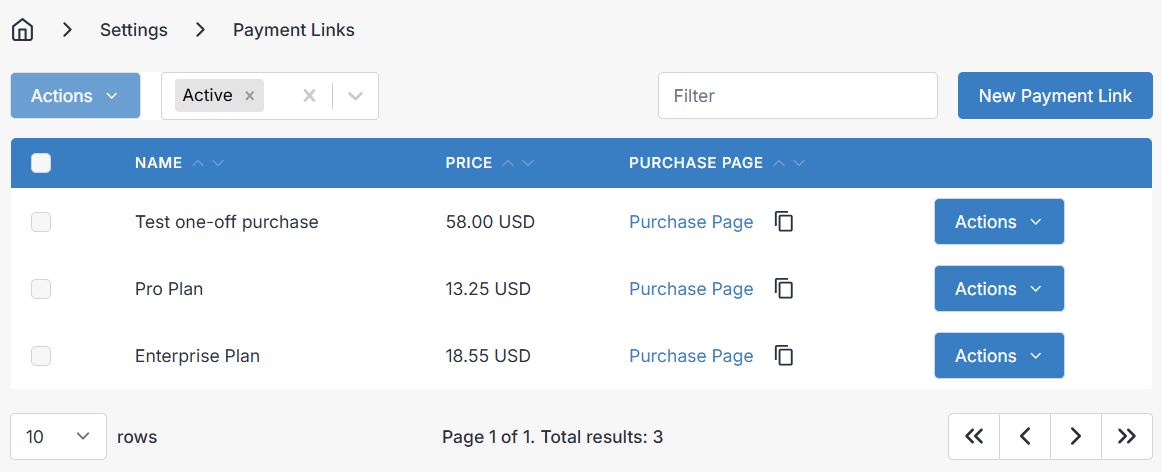
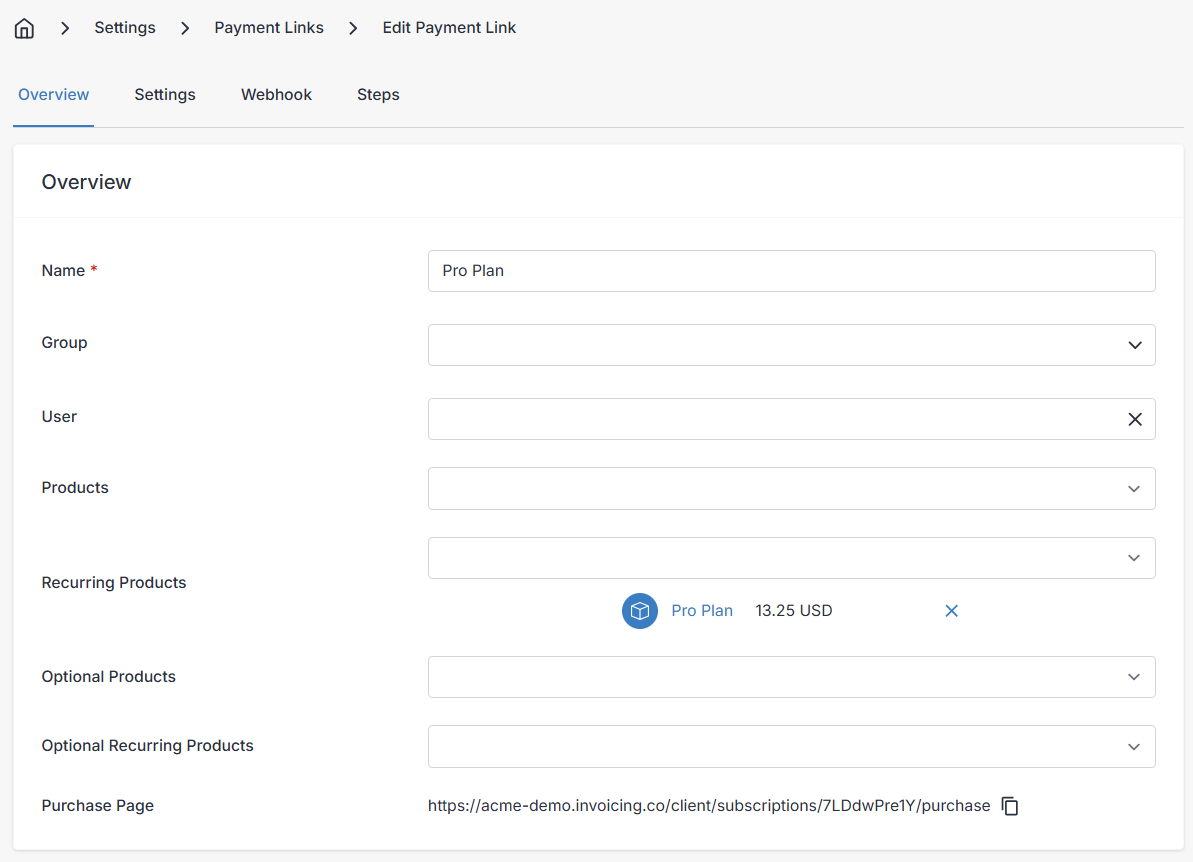
Building a Payment Link
A Payment Link is made up of one or more Products you've already defined. When you create the link, you pick the products to include and the checkout page handles the rest — name, description, price, tax, and currency all flow through from the product record.
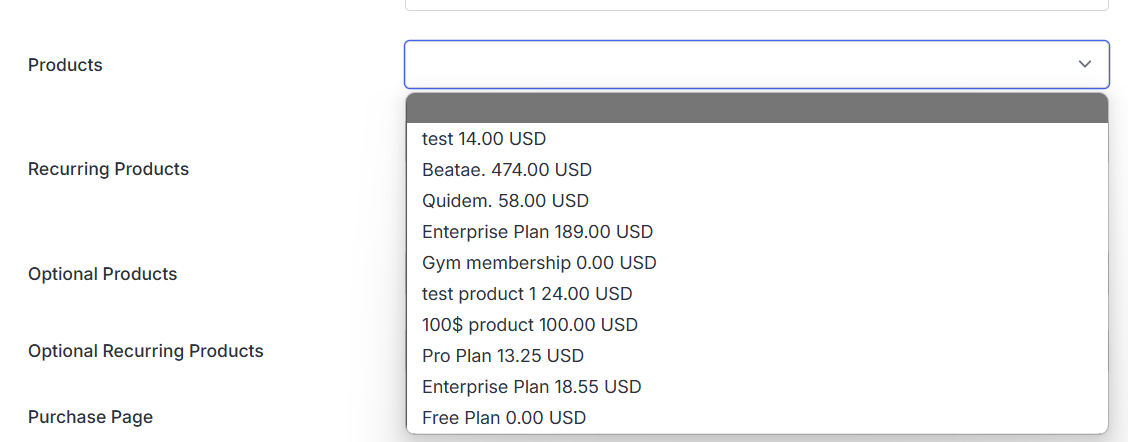
You can mix one-time and recurring products in the same link. A common example is a hosting business that charges a one-off setup fee alongside a monthly server charge: the setup fee lands on the first invoice only, and a recurring invoice takes over from there for the ongoing charge. Digital downloads, course access, retainers, memberships, and physical goods all fit the same pattern.
Settings and Self-Service
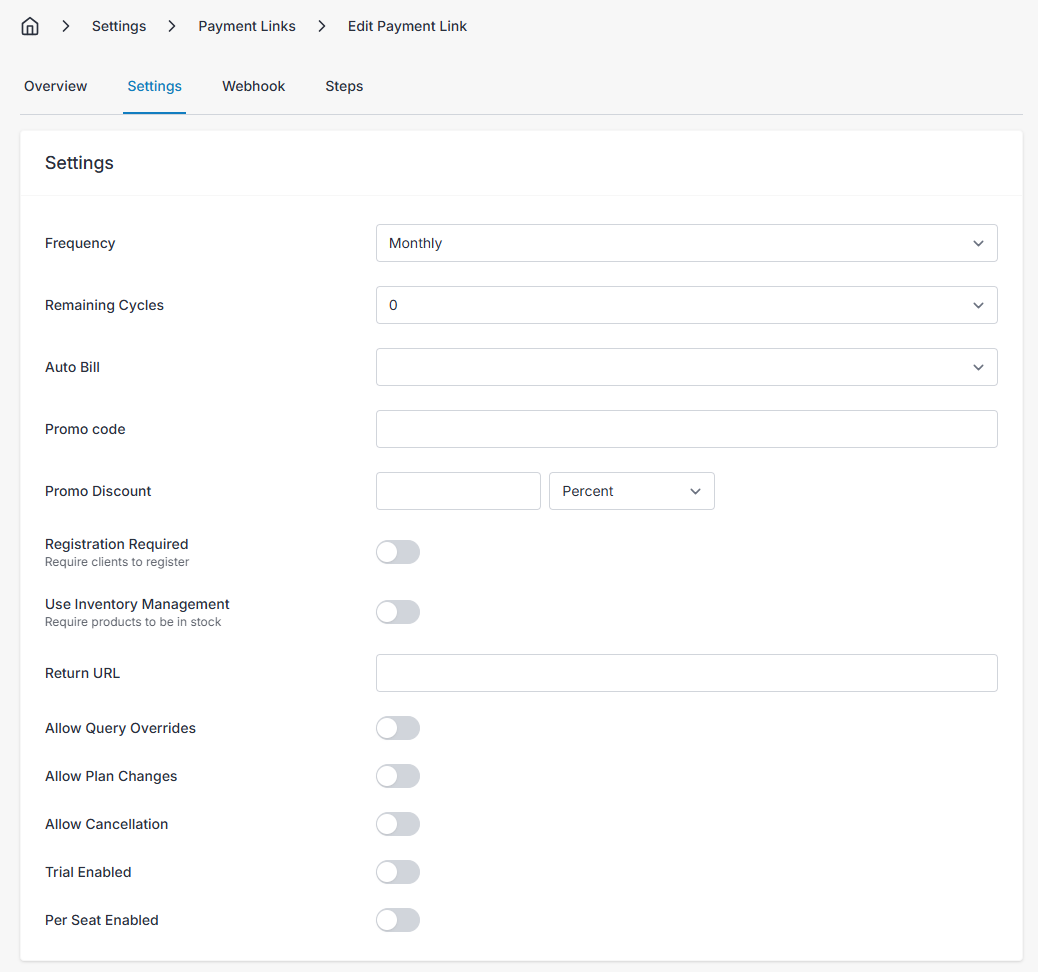
The settings pane is where you set billing frequency, toggle auto-billing, and add promo codes or discounts. It's also where you enable client self-service — once turned on, customers can upgrade, downgrade, or cancel their own subscription from the Client Portal without emailing you. Refunds, when you allow them, are accounted for automatically so your reports stay accurate.
If you want customers to be able to move between plans — say, a Basic, Pro, and Enterprise tier — create a Group and tag each Payment Link with the same group. Any link in the group then shows the others as upgrade or downgrade options on the customer's portal.
Payment Links use the same gateways as the rest of the app, so anything you've configured under Payment Gateways is available at checkout.
Webhook configuration
The final piece of the payment links puzzle is integrating with third party services. When a subscription is purchased, cancelled, or upgraded, Invoice Ninja can notify an external endpoint you control — useful for provisioning accounts, sending license keys, kicking off onboarding, or syncing to your CRM.
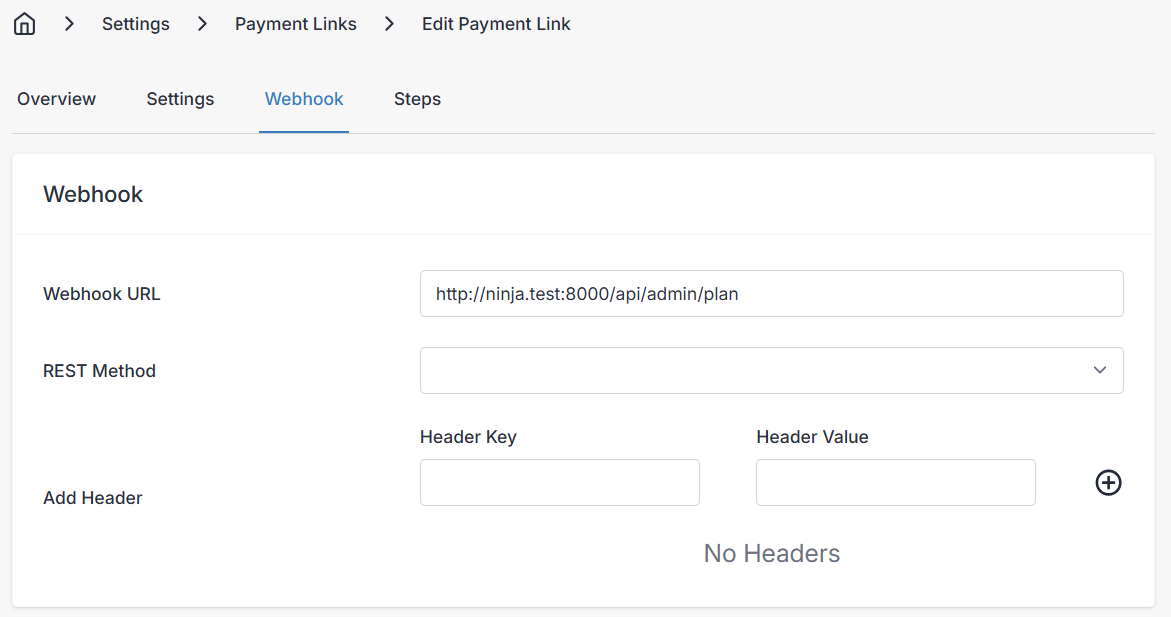
If you need to control events that occur outside of Invoice Ninja, you can configure the webhook endpoints to receive information as the user is stepping through the checkout process. All endpoints must be supported if you activate this feature of the application as the app will fail to proceed without a successful response from each of the following:
Webhooks are single time events that do not retry if your endpoint is unavailable.
Eligibility checker
This request queries the endpoint whether the client/contact is eligible to continue through the checkout. You may use this if you wish to restrict users to one subscription at a time, the payload that is sent to the endpoint looks like this
{
	"context" : "is_eligible",
	"subscription" : "l4zbq7repr",
	"contact" : "l4zbq7repr",
	"contact_email" : "customer@example.com",
	"client" : "l4zbq7repr",
	"account_key" : "unique_identifier",
}
Parameters
context: (string) The context identifier, is_eligible
subscription: The id of the subscription (payment link)
contact: The id of the contact
contact_email: The contact email
client: The id of the client
account_key: A client reference (client.custom_value2)
Response
A standard array should be returned under all circumstances, within the array will be two keys, a successful request will return the following response:
{
	"message" : "Success",
	"status_code" : "200" / HTTP status code 2xx
}
A failed request would return the an array like this:
{
	"message" : "A human readable failure message to pass back to the client",
	"status_code" : "403" / HTTP status code 4xx/5xx
}
Start Trial
If you have configured your payment link to be a trial based subscription. Then after the eligibility check, the system will attempt to start the trial, your endpoint will receive a payload like this:
{
	"context" : "trial",
	"recurring_invoice" : "l4zbq7repr",
	"client" : "l4zbq7repr",
	"subscription" : "l4zbq7repr",
	"account_key" : "unique_identifier",
}
Parameters
context: (string) The context identifier, trial
recurring_invoice: The id of the recurring invoice that was generated based on the payment link
client: The id of the client
subscription: The subscription id
account_key: A client reference (client.custom_value2)
Response
A standard array should be returned under all circumstances, within the array will be two keys, a successful request will return the following response:
{
	"message" : "Success",
	"status_code" : "200" / HTTP status code 2xx
}
A failed request would return the an array like this:
{
	"message" : "A human readable failure message to pass back to the client",
	"status_code" : "403" / HTTP status code 4xx/5xx
}
Recurring Purchase
When a recurring subscription is created for the first time, a payload is sent to the endpoint to notify of a successful subscription creation and payment, the payload will look like this:
{
    "context" : "recurring_purchase",
    "recurring_invoice" : "l4zbq7repr",
    "invoice" : "l4zbq7repr",
    "client" : "l4zbq7repr",
    "subscription" : "l4zbq7repr",
    "contact" : "l4zbq7repr",
	"account_key" : "unique_identifier",
}
Parameters
context: (string) The context identifier, recurring_purchase
recurring_invoice: The id of the recurring invoice that was generated based on the payment link
invoice: The id of the invoice that was generated based on the payment link
client: The id of the client
contact: The id of the contact
subscription: The subscription id
account_key: A client reference (client.custom_value2)
Response
A standard array should be returned under all circumstances, within the array will be two keys, a successful request will return the following response:
{
	"message" : "Success",
	"status_code" : "200" / HTTP status code 2xx
}
A failed request would return the an array like this:
{
	"message" : "A human readable failure message to pass back to the client",
	"status_code" : "403" / HTTP status code 4xx/5xx
}
Single Purchase
Where your payment link is only for a standard product, and not a recurring product, then your endpoint will receive a single purchase webhook with the following configuration:
{
	"context" : "single_purchase",
	"invoice" : "l4zbq7repr",
	"client"  : "l4zbq7repr",
	"subscription" : "l4zbq7repr",
	"account_key" : "unique_identifier",
}
Parameters
context: (string) The context identifier, single_purchase
invoice: The id of the invoice that was generated based on the payment link
client: The id of the client
subscription: The subscription id
account_key: A client reference (client.custom_value2)
Response
A standard array should be returned under all circumstances, within the array will be two keys, a successful request will return the following response:
{
	"message" : "Success",
	"status_code" : "200" / HTTP status code 2xx
}
A failed request would return the an array like this:
{
	"message" : "A human readable failure message to pass back to the client",
	"status_code" : "403" / HTTP status code 4xx/5xx
}
Change Plan
If you support allowing clients to upgrade/downgrade their subscriptions, a change_plan webhook is fired.
When a client changes plans, there may be either a credit due, or a payment depending on the plan and pro rata refund that is generated. In these two cases, the payload differs with either a credit or invoice key appearing in the payload. The following are examples:
{
	"context" : "change_plan",
	"recurring_invoice" : "l4zbq7repr",
	"credit" : "l4zbq7repr",
	"client" : "l4zbq7repr",
	"subscription" : "l4zbq7repr",
	"contact" : "l4zbq7repr",
	"account_key" : "unique_identifier",
}
{
	"context" : "change_plan",
	"recurring_invoice" : "l4zbq7repr",
	"invoice" : "l4zbq7repr",
	"client" : "l4zbq7repr",
	"subscription" : "l4zbq7repr",
	"contact" : "l4zbq7repr",
	"account_key" : "unique_identifier",
}
Parameters
context: (string) The context identifier, change_plan
invoice: The id of the invoice that was generated based on the payment link
credit: The id of the credit that was generated based on the payment link note this field, may be blank if no credit was generated
client: The id of the client
contact: The id of the contact
subscription: The subscription id
account_key: A client reference (client.custom_value2)
Response
A standard array should be returned under all circumstances, within the array will be two keys, a successful request will return the following response:
{
	"message" : "Success",
	"status_code" : "200" / HTTP status code 2xx
}
A failed request would return the an array like this:
{
	"message" : "A human readable failure message to pass back to the client",
	"status_code" : "403" / HTTP status code 4xx/5xx
}
Subscription Cancellation
If you allow subscription cancellations, then the following payload is forwarded to the endpoint:
{
	"context" : "cancellation",
	"subscription" : "l4zbq7repr",
	"recurring_invoice" : "l4zbq7repr",
	"client" : "l4zbq7repr",
	"contact" : "l4zbq7repr",
	"account_key" : "unique_identifier",
}
Parameters
context: (string) The context identifier, cancellation
subscription: The subscription id
recurring_invoice: The id of the recurring invoice that was generated based on the payment link
client: The id of the client
contact: The id of the contact
account_key: A client reference (client.custom_value2)
Response
A standard array should be returned under all circumstances, within the array will be two keys, a successful request will return the following response:
{
	"message" : "Success",
	"status_code" : "200" / HTTP status code 2xx
}
A failed request would return the an array like this:
{
	"message" : "A human readable failure message to pass back to the client",
	"status_code" : "403" / HTTP status code 4xx/5xx
}
Plan Expired
A daily check is performed to check if any subscriptions have gone past their due date without a payment. If a subscription has been found to expired, a webhook is sent with the following payload:
{
	"context" : "plan_expired",
	"client" : "l4zbq7repr",
	"invoice" : "l4zbq7repr",
	"subscription" : "l4zbq7repr",
}
Parameters
context: (string) The context identifier, plan_expired
subscription: The subscription id
invoice: The id of the invoice that was generated based on the payment link
client: The id of the client
Response
A standard array should be returned under all circumstances, within the array will be two keys, a successful request will return the following response:
{
	"message" : "Success",
	"status_code" : "200" / HTTP status code 2xx
}
A failed request would return the an array like this:
{
	"message" : "A human readable failure message to pass back to the client",
	"status_code" : "403" / HTTP status code 4xx/5xx
}
Plan Paid
When a payment for a subscription is made (ie for a renewal), a Plan Paid webhook event is fired with the following configuration:
{
    "context" : "plan_paid",
    "subscription" : "l4zbq7repr",
    "recurring_invoice" : "l4zbq7repr",
    "client" : "l4zbq7repr",
    "contact" : "l4zbq7repr",
    "invoice" : "l4zbq7repr",
    "account_key" : "l4zbq7repr",
}
Parameters
context: (string) The context identifier, plan_expired
subscription: The subscription id
recurring_invoice: The id of the recurring invoice that was generated based on the payment link
invoice: The id of the invoice that was generated based on the payment link
client: The id of the client
contact: The id of the contact
account_key: A client reference (client.custom_value2)
Response
A standard array should be returned under all circumstances, within the array will be two keys, a successful request will return the following response:
{
	"message" : "Success",
	"status_code" : "200" / HTTP status code 2xx
}
A failed request would return the an array like this:
{
	"message" : "A human readable failure message to pass back to the client",
	"status_code" : "403" / HTTP status code 4xx/5xx
}
```bash