Templates
Introduction
Templates allow you to create customized designs and documents using raw data. We have a prebuilt range of templates that will allow you to quickly create Statements / Payment Receipts / Payment Refund Receipts and Delivery Notes, but the functionality does not stop there.
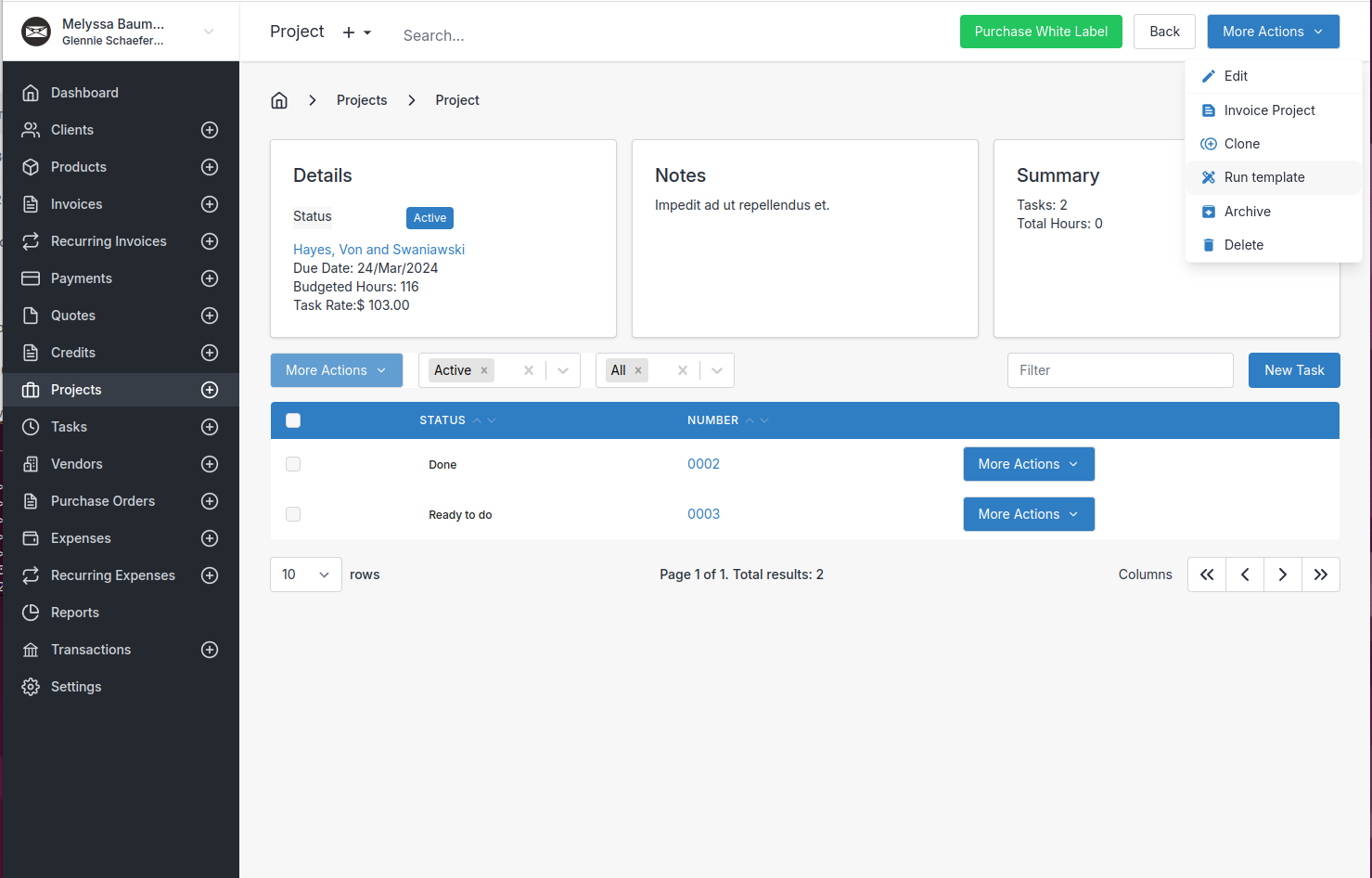
You can also run a templates against any entity within the application and have a PDF returned the the entities dataset embedded in. Here is an example of a template which has been produced from a Project:
When run against our project template, we receive a PDF like this:
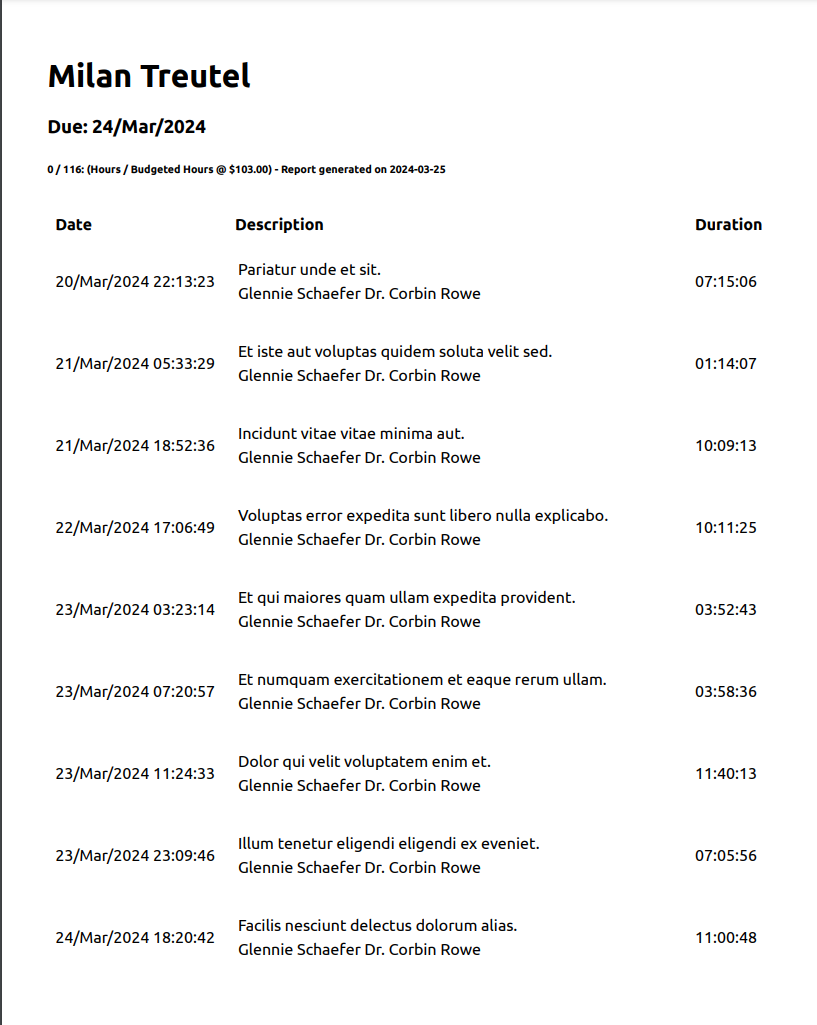
In our template we have constructed (use the Twig templating engine) a document which contain the projects details and a summary of each task time log entry.
Getting Started
Delivery Note Example
Concepts
Templates are simple Html / CSS documents combined with the super powerful twig templating engine.
This combined with the raw data from Invoice Ninja allows you to create a document that exactly fits your requirements. To start, simply create a new template in
Settings / Invoice Design / Custom Designs
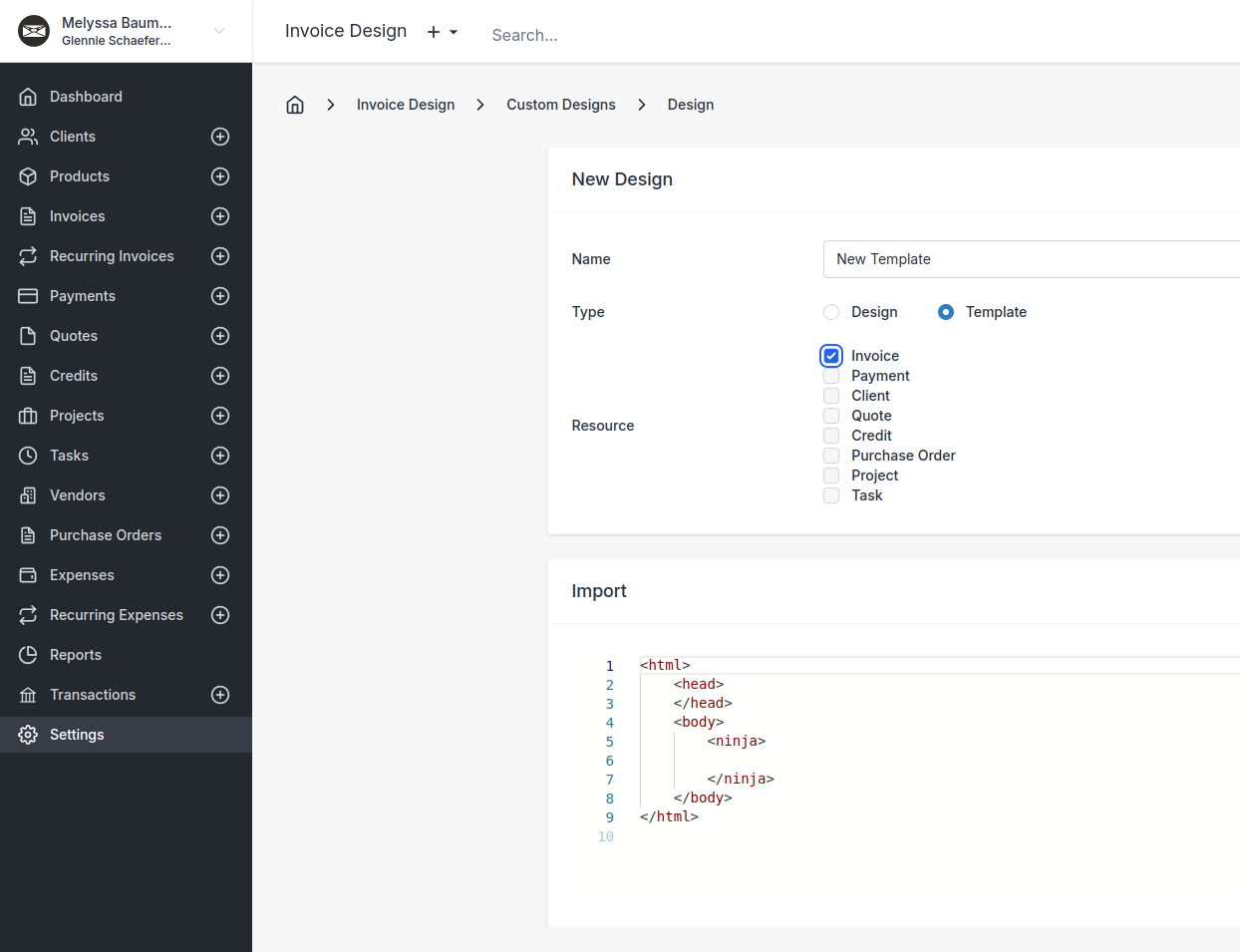
You will see that along with providing a name for the design/template, there is a new selector which allows you to choose whether the design is a regular design (ie for invoices / quotes) or a template which can also be a custom design, but also includes the power twig syntax and data to create bespoke templates.
After selecting the template option, a series of checkboxes will appear where you can associate the data types with the template. This is an important step as it allows us to provide the menu options for this template in the correct location and also provides the correct context when running the template;
for example, if you select the invoice checkbox, the system will be able to prepare your invoice/s to be run through the template. You can select multiple options here and the system will ensure this data is prepared and ready for use in the template.
How did we construct this? Lets take a look at a template sample:
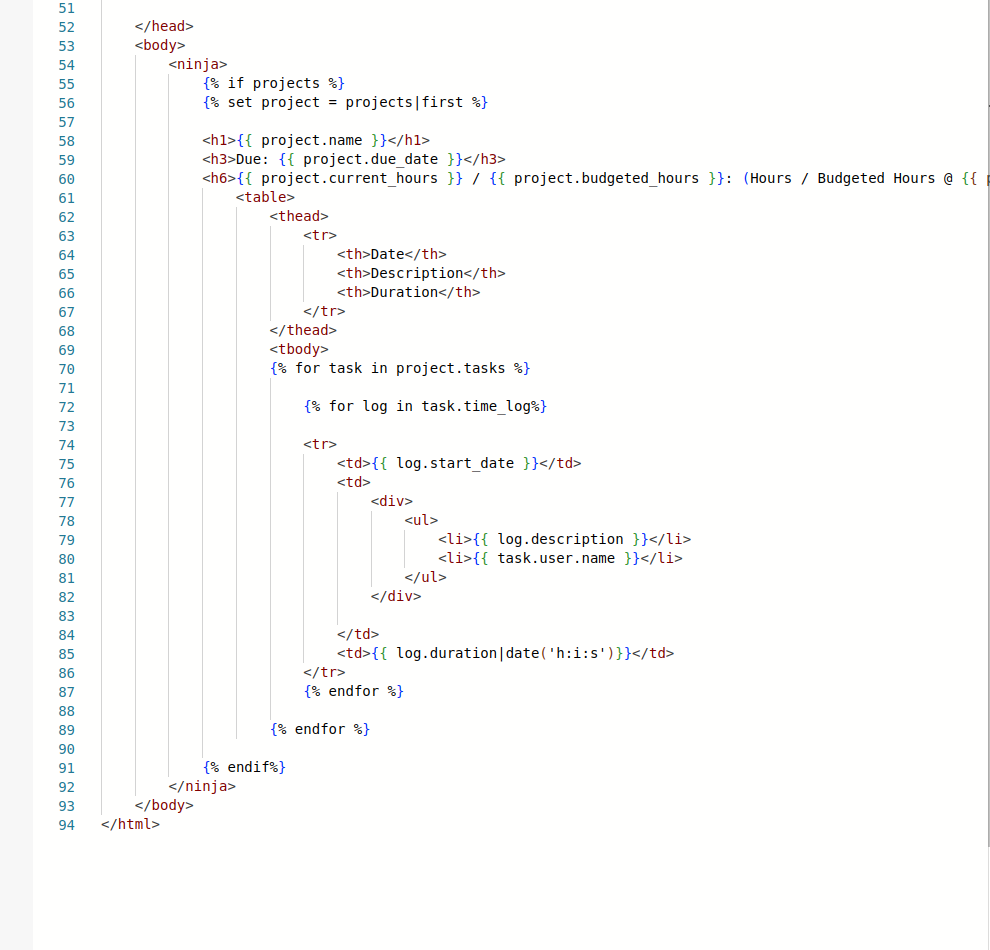
Embedded in the html/css is a dedicated set of <ninja></ninja> tags, this tells the template engine that we are now using the Twig Templating system.
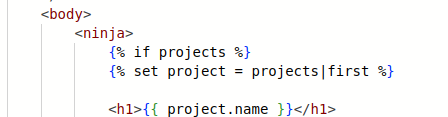
Templates always assume that the data being processed in an array of objects. In this particular case, we have an array of projects. If your template will only ever consider a single project then you'll want to harvest the first project in your array of projects using this syntax:
{% if projects %}
{% set project = projects|first %}
Now that we have the project object, we can use this in our template, to print a variable to the template, you would wrap the variable in {{ }} like this:
<h1>{{ project.name }}</h1>
<h3>Due: {{ project.due_date }}</h3>
<h6>{{ project.current_hours }} / {{ project.budgeted_hours }}: (Hours / Budgeted Hours @ {{ project.task_rate }}) - Report generated on {{ "now"|date('Y-m-d') }}</h6>
We've now started to introduce variables into our template and also some nifty twig formats for dynamic data such as a date using this following syntax to present when the report was generated
Report generated on {{ "now"|date('Y-m-d') }}
Lets now loop through the project tasks and output the time_log data with the following sequence
{% for task in project.tasks %}

    {% for log in task.time_log %}

    <tr>
        <td>{{ log.start_date }}</td>
        <td>
            <div>
                <ul>
                    <li>{{ log.description }}</li>
                    <li>{{ task.user.name }}</li>
                </ul>

        </td>
        <td>{{ log.duration|date('h:i:s')}}</td>
    </tr>
    {% endfor %}

{% endfor %}
Here we have created a for loop, iterating over every task in the project, this follows with another for loop where we loop over every time_log entry in each task where we output the dates / description and duration of each task.
Finally, we are able to transform the log.duration (seconds), into a date format with h:i:s format (Hours:Minutes:Seconds)
Using blocks in templates
If you wish to use standard company/client/vendor details, this is super simple using standard div blocks:
<div id="client-details">

<div id="company-details">

<div id="company-address">

<div id="vendor-details">

<div id="shipping-address">
These will populate using the data stored in Settings > Invoice Designs for each block.
Data Access
Twig variables
Accessing data using twig would be as follows:
First we'd check to ensure the variable is available
{% if tasks|e %}
{% endif %}
Then we can iterate
{% if tasks|e %}

    {% for task in tasks %}
    {% endfor %}

{% endif %}
Accessing data is done using dot notation, for example retrieving the client name of a tasks project would be as follows:
{{ task.project.client.name }}
Invoice Ninja variables
Standard $ notation variables are also available within templates, this allows you to use familiar variables such as $invoice.amount - you can also combine twig and ninja variables like this to integrate conditionals into your template. ie
{% if invoice.balance > 0 %}
 $invoice.balance is payable!
{% else %}
 Invoice has been paid! Thanks!
{% endif %}
Allowed Tags
- if
- for
- set
- filter
Allowed Filters
Filters change how a value is displayed. Add a filter after a value using a pipe (|). For example:
{{ project.name|upper }}
{{ project.tags|join(', ') }}
{{ project.quotes|length }}
{{ quote.project.name|default('No project') }}
The following filters are available:
- abs
- batch
- capitalize
- date
- date_modify
- default
- e
- escape
- filter
- first
- format_currency
- format_date
- format_number
- format_percent_number
- format_spellout_number
- groupBy
- join
- json_decode
- keys
- length
- lower
- map
- markdown_to_html
- merge
- nl2br
- number_format
- reduce
- replace
- reverse
- round
- shuffle
- slice
- sort
- split
- striptags
- sum
- title
- trim
- upper
- url_encode
Allowed Functions
- range
- cycle
- date
- img
- t
Allowed Properties
- type_id
Using Projects and Quotes Together
A project template can list the quotes linked to that project. A quote template can also display details from its linked project.
| Starting with | Related information available |
|---|---|
| Project | The project's quotes, using project.quotes |
| Quote | The quote's project, using quote.project |
To list the quotes linked to the first project in a template:
{% if projects %}
    {% set project = projects|first %}

    {% if project.quotes %}
        <h2>Quotes</h2>
        <ul>
            {% for quote in project.quotes %}
                <li>Quote {{ quote.number }} — {{ quote.date }} — {{ quote.amount }}</li>
            {% endfor %}
        </ul>
    {% endif %}
{% endif %}
To show the project linked to the first quote in a template:
{% if quotes %}
    {% set quote = quotes|first %}

    {% if quote.project %}
        <p>Project: {{ quote.project.name }}</p>
    {% endif %}
{% endif %}
When a quote displays its project, the project's quotes, invoices, tasks, and expenses lists are empty. This prevents the same related information from repeating indefinitely. Start with a project template when you need to use those lists.
Statements
Statements are special objects in templates. Because the input data point is a client/s we need additional information to understand whether a template is a "statement" template or not.
When creating custom statements, you will want to insert a comment within the template so that the system can resolve that it is a statement for processing
<!doctype html>
<!-- Statement - TemplateID #TS4 ##statement##-->
<html>
<head>
Note the special text
##statement##
This will allow the system to resolve a custom statement.
Object Json Definitions
Here are the object definitions that are available.
Invoice
{
"invoices": [
{
"amount": "$6,606.30",
"balance": "$6,606.30",
"status_id": 2,
"status": "Sent",
"amount_raw": "6606.300000",
"balance_raw": "6606.300000",
"number": "0001",
"discount": "6.000000",
"po_number": "Unde.",
"date": "25. March 2024",
"last_sent_date": "",
"next_send_date": "",
"due_date": "",
"terms": "Default company invoice terms",
"public_notes": "",
"private_notes": "",
"uses_inclusive_taxes": false,
"tax_name1": "GST",
"tax_rate1": 10,
"tax_name2": "VAT",
"tax_rate2": 17.5,
"tax_name3": "THIRDTAX",
"tax_rate3": 5,
"total_taxes": "$1,905.44",
"total_taxes_raw": "1905.440000",
"is_amount_discount": false,
"footer": "Default invoice footer",
"partial": "0.000000",
"partial_due_date": "",
"custom_value1": "",
"custom_value2": "",
"custom_value3": "",
"custom_value4": "",
"custom_surcharge1": 0,
"custom_surcharge2": 0,
"custom_surcharge3": 0,
"custom_surcharge4": 0,
"exchange_rate": 1,
"custom_surcharge_tax1": false,
"custom_surcharge_tax2": false,
"custom_surcharge_tax3": false,
"custom_surcharge_tax4": false,
"reminder1_sent": "",
"reminder2_sent": "",
"reminder3_sent": "",
"reminder_last_sent": "",
"paid_to_date": "$0.00",
"auto_bill_enabled": false,
"actual_delivery_date": "25. March 2024",
"invoice_period": "01/03/2024 - 31/03/2024",
"project": {
"id": "Wpmbk5ezJn",
"name": "Date App",
"number": "0006"
},
"line_items": [
{
"quantity": 1,
"cost": "$372.00",
"product_key": "Ut in.",
"notes": "Architecto at est.",
"discount": 0,
"is_amount_discount": false,
"tax_name1": "Sales Tax",
"tax_rate1": 5,
"tax_name2": "",
"tax_rate2": 0,
"tax_name3": "",
"tax_rate3": 0,
"sort_id": "0",
"line_total": "$372.00",
"gross_line_total": "$389.48",
"custom_value1": "https://picsum.photos/200",
"custom_value2": "75",
"custom_value3": "Nulla est incidunt.",
"custom_value4": "Consequatur in.",
"type_id": "1",
"product_cost": "$0.00",
"tax_amount": "$17.48",
"date": "",
"tax_id": "1",
"task_id": "",
"expense_id": "",
"_id": "358982ee-f062-42f3-9dcf-4068e9347fa0",
"cost_raw": 372,
"discount_raw": 0,
"line_total_raw": "372.00",
"gross_line_total_raw": 389.48,
"tax_amount_raw": 17.48,
"product_cost_raw": 0,
"task": {
"number": "0007",
"description": "The task description",
"duration": 726023,
"rate": "$0.00",
"rate_raw": "0.000000",
"created_at": "21. March 2024",
"updated_at": "27. March 2024",
"date": "21. March 2024",
"project": {
"name": "Date App",
"number": "0006",
"created_at": "22. March 2024",
"updated_at": "22. March 2024",
"task_rate": "$0.00",
"task_rate_raw": "0.000000",
"due_date": "",
"private_notes": "",
"public_notes": "",
"budgeted_hours": 1200,
"custom_value1": "",
"custom_value2": "",
"custom_value3": "",
"custom_value4": "",
"color": "",
"current_hours": 0,
"client": {
"name": "Kilback-Stoltenberg",
"balance": "0.000000",
"payment_balance": "0.000000",
"credit_balance": "2084.140000",
"vat_number": "428950405",
"address1": "5 Wallaby Way",
"address2": "Apt 1",
"phone": "555 123-1321",
"city": "Sydney",
"state": "NSW",
"postal_code": "2113",
"country_id": "840",
"group": "Special Orders",
"location": {
"location_name": "Billy",
"address": "44 Nice Street<br/>Apt 5<br/>Nicest City, Best State 90210<br/>United States<br/>",
"address1": "44 Nice Street",
"address2": "Apt 5",
"city": "Nicest City",
"state": "Best State",
"postal_code": "90210",
"country": "USA"
}
},
"user": {
"name": "Glennie Schaefer Dr. Corbin Rowe",
"email": "small@example.com"
}
},
"time_log": [
{
"start_date_raw": 1711012404,
"start_date": "20. March 2024 22:13:24",
"end_date_raw": 1711095351,
"end_date": "21. March 2024 21:15:51",
"description": "Consequatur voluptas aperiam sapiente optio non dolores quaerat.",
"billable": true,
"duration_raw": 82947,
"duration": "23:02:27"
},
{
"start_date_raw": 1711095651,
"start_date": "21. March 2024 21:20:51",
"end_date_raw": 1711149254,
"end_date": "22. March 2024 12:14:14",
"description": "Aut iusto ducimus molestiae reprehenderit fugiat cum.",
"billable": true,
"duration_raw": 53603,
"duration": "14:53:23"
},
],
"custom_value1": "",
"custom_value2": "",
"custom_value3": "",
"custom_value4": "",
"status": "Ready to do",
"user": {
"name": "Glennie Schaefer Dr. Corbin Rowe",
"email": "small@example.com"
},
"client": {
"name": "Kilback-Stoltenberg",
"balance": "0.000000",
"payment_balance": "0.000000",
"credit_balance": "2084.140000",
"vat_number": "428950405",
"address1": "5 Wallaby Way",
"address2": "Apt 1",
"phone": "555 123-1321",
"city": "Sydney",
"state": "NSW",
"postal_code": "2113",
"country_id": "840",
"group": "Special Orders",
"location": {
"location_name": "Billy",
"address": "44 Nice Street<br/>Apt 5<br/>Nicest City, Best State 90210<br/>United States<br/>",
"address1": "44 Nice Street",
"address2": "Apt 5",
"city": "Nicest City",
"state": "Best State",
"postal_code": "90210",
"country": "USA"
}
}
}
},
{
"quantity": 1,
"cost": "$73.00",
"product_key": "Non.",
"notes": "Aut sunt totam.",
"discount": 0,
"is_amount_discount": false,
"tax_name1": "Sales Tax",
"tax_rate1": 5,
"tax_name2": "",
"tax_rate2": 0,
"tax_name3": "",
"tax_rate3": 0,
"sort_id": "0",
"line_total": "$73.00",
"gross_line_total": "$76.43",
"custom_value1": "https://picsum.photos/200",
"custom_value2": "29",
"custom_value3": "Accusamus quo.",
"custom_value4": "Qui similique culpa.",
"type_id": "1",
"product_cost": "$0.00",
"tax_amount": "$3.43",
"date": "",
"tax_id": "1",
"task_id": "",
"expense_id": "",
"_id": "013efb0f-5f11-45fc-b404-20427fb0e2a0",
"cost_raw": 73,
"discount_raw": 0,
"line_total_raw": "73.00",
"gross_line_total_raw": 76.43,
"tax_amount_raw": 3.43,
"product_cost_raw": 0
},
],
"client": {
"name": "Kub, Koepp and Conroy",
"number": "0001",
"id_number": "ABC-1234",
"invoice_term_days": 30,
"quote_term_days": 14,
"balance": "6606.300000",
"payment_balance": "0.000000",
"credit_balance": "0.000000",
"vat_number": "373145743",
"address1": "5 Wallaby Way",
"address2": "Apt 1",
"phone": "555 123-1321",
"city": "Sydney",
"state": "NSW",
"postal_code": "2113",
"country_id": "840",
"group": "Special Orders",
"location": {
"location_name": "Billy",
"address": "44 Nice Street<br/>Apt 5<br/>Nicest City, Best State 90210<br/>United States<br/>",
"address1": "44 Nice Street",
"address2": "Apt 5",
"city": "Nicest City",
"state": "Best State",
"postal_code": "90210",
"country": "USA"
}
},
"payments": [
{
"status": "Refunded",
"badge": "<h6><span class=\"badge badge-primary\">Refunded<\/span><\/h6>",
"amount": "$104.95",
"applied": "$104.95",
"balance": "-$104.95",
"refunded": "$104.95",
"amount_raw": "104.950000",
"applied_raw": "104.950000",
"refunded_raw": "104.950000",
"balance_raw": -104.95,
"date": "24. March 2024",
"method": "",
"currency": "USD",
"exchange_rate": 1,
"transaction_reference": null,
"is_manual": 1,
"number": "0003",
"custom_value1": "",
"custom_value2": "",
"custom_value3": "",
"custom_value4": "",
"created_at": "25. March 2024",
"updated_at": "25. March 2024",
"refund_activity": ["24. March 2024 Invoice #0029 $104.95 Refunded"],
"client": {
"name": "cypress",
"balance": "0.000000",
"payment_balance": "333.000000",
"credit_balance": "0.000000",
"vat_number": "561724719",
"address1": "5 Wallaby Way",
"address2": "Apt 1",
"phone": "555 123-1321",
"city": "Sydney",
"state": "NSW",
"postal_code": "2113",
"country_id": "840",
"group": "Special Orders",
"location": {
"location_name": "Billy",
"address": "44 Nice Street<br/>Apt 5<br/>Nicest City, Best State 90210<br/>United States<br/>",
"address1": "44 Nice Street",
"address2": "Apt 5",
"city": "Nicest City",
"state": "Best State",
"postal_code": "90210",
"country": "USA"
}
},
"paymentables": [
{
"invoice": "0029",
"credit": "",
"amount_raw": "104.9500",
"refunded_raw": "104.9500",
"net_raw": 0,
"amount": "$104.95",
"refunded": "$104.95",
"net": "$0.00",
"is_credit": false,
"date": "24. March 2024",
"created_at": "25. March 2024",
"updated_at": "25. March 2024",
"timestamp": 1711329333
}
],
}
],
"total_tax_map": [
{
"name": "GST 10%",
"total": 470.09
},
{
"name": "VAT 17.5%",
"total": 822.65
},
{
"name": "THIRDTAX 5%",
"total": 235.04
}
],
"line_tax_map": [
{
"name": "Sales Tax 5%",
"total": 124.72999999999999
},
{
"name": "VAT 17.5%",
"total": 117.95
},
{
"name": "GST 10%",
"total": 134.98
}
]
}
]
}
Payment
{
    "payments": [
        {
            "status": "Completed",
            "badge": "<h6><span class=\"badge badge-info\">Completed<\/span><\/h6>",
            "amount": "$6,723.74",
            "applied": "$6,723.74",
            "balance": "$0.00",
            "refunded": "$0.00",
            "amount_raw": "6723.740000",
            "applied_raw": "6723.740000",
            "refunded_raw": "0.000000",
            "balance_raw": 0,
            "date": "22. March 2024",
            "method": "",
            "currency": "USD",
            "exchange_rate": 1,
            "transaction_reference": "Manual entry",
            "is_manual": 1,
            "number": "0002",
            "custom_value1": "",
            "custom_value2": "",
            "custom_value3": "",
            "custom_value4": "",
            "created_at": "22. March 2024",
            "updated_at": "22. March 2024",
            "client": {
                "name": "Kilback-Stoltenberg",
                "balance": "0.000000",
                "payment_balance": "0.000000",
                "credit_balance": "2084.140000",
                "vat_number": "428950405",
                "address1": "5 Wallaby Way",
                "address2": "Apt 1",
                "phone": "555 123-1321",
                "city": "Sydney",
                "state": "NSW",
                "postal_code": "2113",
                "country_id": "840",
                "group": "Special Orders",
                "location": {
                    "location_name": "Billy",
                    "address": "44 Nice Street<br/>Apt 5<br/>Nicest City, Best State 90210<br/>United States<br/>",
                    "address1": "44 Nice Street",
                    "address2": "Apt 5",
                    "city": "Nicest City",
                    "state": "Best State",
                    "postal_code": "90210",
                    "country": "USA"
                }
            },
            "paymentables": [],
            "refund_activity": []
        }
    ]
}
Task
{
    "tasks": [
        {
            "number": "0007",
            "description": "The task description",
            "duration": 726023,
            "rate": "$0.00",
            "rate_raw": "0.000000",
            "created_at": "21. March 2024",
            "updated_at": "27. March 2024",
            "date": "21. March 2024",
            "project": {
                "id": "Wpmbk5ezJn",
                "name": "Date App",
                "number": "0006",
                "created_at": "22. March 2024",
                "updated_at": "22. March 2024",
                "task_rate": "$0.00",
                "task_rate_raw": "0.000000",
                "due_date": "",
                "private_notes": "",
                "public_notes": "",
                "budgeted_hours": 1200,
                "custom_value1": "",
                "custom_value2": "",
                "custom_value3": "",
                "custom_value4": "",
                "color": "",
                "current_hours": 0,
                "tasks": [],
                "invoices": [],
                "assigned_user": [],
                "client": {
                    "name": "Kilback-Stoltenberg",
                    "balance": "0.000000",
                    "payment_balance": "0.000000",
                    "credit_balance": "2084.140000",
                    "vat_number": "428950405",
                    "address1": "5 Wallaby Way",
                    "address2": "Apt 1",
                    "phone": "555 123-1321",
                    "city": "Sydney",
                    "state": "NSW",
                    "postal_code": "2113",
                    "country_id": "840",
                    "group": "Special Orders",
                    "location": {
                        "location_name": "Billy",
                        "address": "44 Nice Street<br/>Apt 5<br/>Nicest City, Best State 90210<br/>United States<br/>",
                        "address1": "44 Nice Street",
                        "address2": "Apt 5",
                        "city": "Nicest City",
                        "state": "Best State",
                        "postal_code": "90210",
                        "country": "USA"
                    }
                },
                "user": {
                    "name": "Glennie Schaefer Dr. Corbin Rowe",
                    "email": "small@example.com"
                }
            },
            "time_log": [
                {
                    "start_date_raw": 1711012404,
                    "start_date": "20. March 2024 22:13:24",
                    "end_date_raw": 1711095351,
                    "end_date": "21. March 2024 21:15:51",
                    "description": "Consequatur voluptas aperiam sapiente optio non dolores quaerat.",
                    "billable": true,
                    "duration_raw": 82947,
                    "duration": "23:02:27"
                },
                {
                    "start_date_raw": 1711095651,
                    "start_date": "21. March 2024 21:20:51",
                    "end_date_raw": 1711149254,
                    "end_date": "22. March 2024 12:14:14",
                    "description": "Aut iusto ducimus molestiae reprehenderit fugiat cum.",
                    "billable": true,
                    "duration_raw": 53603,
                    "duration": "14:53:23"
                },
            ],
            "custom_value1": "",
            "custom_value2": "",
            "custom_value3": "",
            "custom_value4": "",
            "status": "Ready to do",
            "user": {
                "name": "Glennie Schaefer Dr. Corbin Rowe",
                "email": "small@example.com",
                "signature": "<p>Regards, Glennie</p>"
            },
            "assigned_user": [],
            "client": {
                "name": "Kilback-Stoltenberg",
                "number": "0001",
                "id_number": "ABC-1234",
                "invoice_term_days": 30,
                "quote_term_days": 14,
                "balance": "0.000000",
                "payment_balance": "0.000000",
                "credit_balance": "2084.140000",
                "vat_number": "428950405",
                "address1": "5 Wallaby Way",
                "address2": "Apt 1",
                "phone": "555 123-1321",
                "city": "Sydney",
                "state": "NSW",
                "postal_code": "2113",
                "country_id": "840",
                "group": "Special Orders",
                "location": {
                    "location_name": "Billy",
                    "address": "44 Nice Street<br/>Apt 5<br/>Nicest City, Best State 90210<br/>United States<br/>",
                    "address1": "44 Nice Street",
                    "address2": "Apt 5",
                    "city": "Nicest City",
                    "state": "Best State",
                    "postal_code": "90210",
                    "country": "USA"
                }
            }
        }
    ]
}
Company
The company object is exposed as a top-level template variable carrying scalar fields describing the company that owns the entity being rendered.
{
    "company": {
        "name": "Acme Pty Ltd",
        "classification": "business",
        "address1": "1 Main St",
        "address2": "Suite 200",
        "city": "Sydney",
        "state": "NSW",
        "postal_code": "2000",
        "country": "Australia",
        "country_2": "AU",
        "city_state_postal": "Sydney, NSW 2000",
        "postal_city_state": "2000 Sydney, NSW",
        "postal_city": "2000 Sydney",
        "phone": "555 123 1321",
        "email": "hello@acme.test",
        "vat_number": "123456789",
        "id_number": "ABC-1234",
        "website": "https://acme.test",
        "payment_terms": "30",
        "valid_until": "14",
        "custom1": "",
        "custom2": "",
        "custom3": "",
        "custom4": ""
    }
}
Definitions
Invoice / Quote / Credit / Purchase Order Definition
| Field | Description | Example |
|---|---|---|
| amount | formatted currency | $6,606.30 |
| balance | formatted currency | $6,606.30 |
| status_id | integer representation of the status | 2 |
| status | text representation of invoice status | Sent |
| amount_raw | float | 6606.300000 |
| balance_raw | float | 6606.300000 |
| number | invoice number | 0001 |
| discount | float | 6.000000 |
| po_number | string | Unde. |
| date | string | 25. March 2024 |
| last_sent_date | string | 25. March 2024 |
| next_send_date | string | 25. March 2024 |
| due_date | string | 25. March 2024 |
| terms | string | Default company invoice terms |
| public_notes | string | Public Notes |
| private_notes | string | Private notes |
| uses_inclusive_taxes | boolean | false |
| tax_name1 | string | GST |
| tax_rate1 | float | 1 |
| tax_name2 | string | VAT |
| tax_rate2 | float | 17. |
| tax_name3 | string | THIRDTAX |
| tax_rate3 | float | 0 |
| total_taxes | formatted currency | $1,905.44 |
| total_taxes_raw | float | 1905.440000 |
| is_amount_discount | bool | false |
| footer | string | Default invoice footer |
| partial | float | 0.000000 |
| partial_due_date | string | 24/1/2024 |
| custom_value1 | string | Custom Value |
| custom_value2 | string | Custom Value |
| custom_value3 | string | Custom Value |
| custom_value4 | string | Custom Value |
| custom_surcharge1 | float | 0 |
| custom_surcharge2 | float | 0 |
| custom_surcharge3 | float | 0 |
| custom_surcharge4 | float | 0 |
| exchange_rate | float | 1 |
| custom_surcharge_tax1 | boolean | false |
| custom_surcharge_tax2 | boolean | false |
| custom_surcharge_tax3 | boolean | false |
| custom_surcharge_tax4 | boolean | false |
| reminder1_sent | string | 25. March 2024 |
| reminder2_sent | string | 25. March 2024 |
| reminder3_sent | string | 25. March 2024 |
| reminder_last_sent | string | 25. March 2024 |
| paid_to_date | formatted currency | $0.00 |
| auto_bill_enabled | booleam (Invoice/Credit only) | false |
| valid_until | string (Quote/Credit only) | 25. April 2024 |
| project | object (Invoice and Quote only) | Project |
| actual_delivery_date | string (Invoice only, from e-invoice payload) | 25. March 2024 |
| invoice_period | string (Invoice only, from e-invoice payload) | 01/03/2024 - 31/03/2024 |
| vendor | object (Purchase Order only — reduced shape: name, vat_number, currency) | { name: "Acme", vat_number: "...", currency: "USD" } |
| is_deleted | boolean (Purchase Order only) | false |
| has_tasks | boolean (Purchase Order only) | false |
| has_expenses | boolean (Purchase Order only) | false |
| currency_id | string (Purchase Order only) | 1 |
| line_items | array | Line items |
| client | object | Client |
| payments | array (Invoice/Credit only) | Payment |
| total_tax_map | array | Tax Map |
| line_tax_map | array | Tax Map |
| tags | Array of tag names assigned to the record | ["Priority", "Retainer"] |
Note: reminder1_sent, reminder2_sent, reminder3_sent, reminder_last_sent, and auto_bill_enabled are emitted for Invoices and Credits only. payments is emitted for Invoices and Credits only. Quotes and Purchase Orders do not include these fields.
Line items definition
| Field | Description | Example |
|---|---|---|
| quantity | float | 1 |
| cost | formatted currency | $372.00 |
| product_key | string | Ut in. |
| notes | string | Architecto at est. |
| discount | float | 0 |
| is_amount_discount | boolean | false |
| tax_name1 | string | Sales Tax |
| tax_rate1 | float | 5 |
| tax_name2 | string | |
| tax_rate2 | float | 0 |
| tax_name3 | string | |
| tax_rate3 | float | 0 |
| sort_id | float | 0 |
| line_total | formatted currency | $372.00 |
| gross_line_total | formatted currency | $389.48 |
| custom_value1 | string | https://picsum.photos/200 |
| custom_value2 | string | 75 |
| custom_value3 | string | Nulla est incidunt. |
| custom_value4 | string | Consequatur in. |
| type_id | string | 1 |
| product_cost | formatted currency | $0.00 |
| tax_amount | formatted currency | $17.48 |
| date | string | 24/1/2023 |
| tax_id | string | 1 |
| task_id | string | |
| task | object | Task |
| expense_id | string | |
| _id | string | 358982ee-f062-42f3-9dcf-4068e9347fa0 |
| cost_raw | float | 372 |
| net_cost | string | $372.00 |
| net_cost_raw | float | 372.00 |
| discount_raw | float | 0 |
| line_total_raw | float | 372.00 |
| gross_line_total_raw | float | 389.48 |
| tax_amount_raw | float | 17.48 |
| product_cost_raw | float | 0 |
Tax map definition
| Field | Description | Example |
|---|---|---|
| name | string | GST 10% |
| total | float | 470.09 |
Payment definition
| Field | Description | Example |
|---|---|---|
| status | string | Refunded |
| badge | string | Refunded |
| amount | formatted currency | $104.95 |
| applied | formatted currency | $104.95 |
| balance | formatted currency | -$104.95 |
| refunded | formatted currency | $104.95 |
| amount_raw | float | 104.950000 |
| applied_raw | float | 104.950000 |
| refunded_raw | float | 104.950000 |
| balance_raw | float | -104.95 |
| date | string | 24. March 2024 |
| method | string | Visa |
| currency | string | USD |
| exchange_rate | float | 1 |
| transaction_reference | string | 2sd2fv34 |
| is_manual | boolean | 1 |
| number | string | 0003 |
| custom_value1 | string | Custom Value |
| custom_value2 | string | Custom Value |
| custom_value3 | string | Custom Value |
| custom_value4 | string | Custom Value |
| created_at | string | 25. March 2024 |
| updated_at | string | 25. March 2024 |
| refund_activity | array of string | [24. March 2024 Invoice #0029 $104.95 Refunded] |
| paymentables | array | Paymentables |
| client | object | Client |
| tags | Array of tag names assigned to the payment | ["Online", "Deposit"] |
Paymentables definition
| Field | Description | Example |
|---|---|---|
| invoice | string (present when the paymentable is an invoice) | 0029 |
| credit | string (present when the paymentable is a credit; mutually exclusive with invoice) | 0012 |
| amount_raw | float | 104.9500 |
| refunded_raw | float | 104.9500 |
| net_raw | float | 0 |
| amount | formatted currency | $104.95 |
| refunded | formatted currency | $104.95 |
| net | formatted currency | $0.00 |
| is_credit | boolean | false |
| date | string | 24. March 2024 |
| created_at | string | 25. March 2024 |
| updated_at | string | 25. March 2024 |
| timestamp | unix timestamp | 171132933 |
Task Definition
| Field | Description | Example |
|---|---|---|
| number | Task number | 0007 |
| description | Task Description | Service for bob |
| duration | Duration of task in seconds | 72602 |
| rate | Task rate currency formatted | $0.00 |
| rate_raw | Task rate raw float | 0.000000 |
| created_at | Date task created | 21. March 2024 |
| updated_at | Date task updated | 27. March 2024 |
| date | Date of task | 21. March 2024 |
| custom_value1 | Task Custom Value 1 | Custom Value |
| custom_value2 | Task Custom Value 2 | Custom Value |
| custom_value3 | Task Custom Value 3 | Custom Value |
| custom_value4 | Task Custom Value 4 | Custom Value |
| status | The task status | Ready to do |
| user | The Creating User Object | See User Property definition |
| assigned_user | The assigned User Object (or empty array if none) | See User Property definition |
| client | The Client Object | See Client Property definition |
| project | The Project Object (when emitted via processTasks). When the task is embedded inside an invoice line item, this is a string containing the project name instead of an object. | See Project Property definition |
| time_log | Array of time log entries | See time_log definition |
| tags | Tag names assigned to the task | ["Design", "Priority"] |
Expense Definition
| Field | Description | Example |
|---|---|---|
| number | The expense number | 0001 |
| category | The expense category | Travel |
| amount | The expense amount | $100.00 |
| amount_raw | The expense amount raw | 100.00 |
| date | The expense date | 24. March 2024 |
| private_notes | The expense private notes | Private notes |
| public_notes | The expense public notes | Public notes |
| exchange_rate | The expense exchange rate | 1.00 |
| tax_name1 | The expense tax name 1 | GST |
| tax_rate1 | The expense tax rate 1 | 10 |
| tax_name2 | The expense tax name 2 | VAT |
| tax_rate2 | The expense tax rate 2 | 17 |
| tax_name3 | The expense tax name 3 | THIRDTAX |
| tax_rate3 | The expense tax rate 3 | 0 |
| tax_amount1 | The expense tax amount 1 | $10.00 |
| tax_amount2 | The expense tax amount 2 | $17.00 |
| tax_amount3 | The expense tax amount 3 | $0.00 |
| payment_date | The expense payment date | 24. March 2024 |
| transaction_reference | The expense transaction reference | 1234567890 |
| custom_value1 | The expense custom value 1 | Custom Value |
| custom_value2 | The expense custom value 2 | Custom Value |
| custom_value3 | The expense custom value 3 | Custom Value |
| custom_value4 | The expense custom value 4 | Custom Value |
| calculate_tax_by_amount | The expense calculate tax by amount | true |
| uses_inclusive_taxes | The expense uses inclusive taxes | true |
| client | The expense client | Client |
| vendor | The expense vendor | Vendor |
| project | The expense project | Project |
| invoice | Array of invoices the expense is linked to (when applicable) | Invoice |
| tags | Tag names assigned to the expense | ["Travel", "Billable"] |
Vendor Definition
| Field | Description | Example |
|---|---|---|
| name | The vendor name | Vendor Name |
| phone | The vendor phone | 1234567890 |
| website | The vendor website | https://www.vendor.com |
| number | The vendor number | 1234567890 |
| id_number | The vendor id number | 1234567890 |
| vat_number | The vendor vat number | 1234567890 |
| currency | The vendor currency | USD |
| custom_value1 | The vendor custom value 1 | Custom Value |
| custom_value2 | The vendor custom value 2 | Custom Value |
| custom_value3 | The vendor custom value 3 | Custom Value |
| custom_value4 | The vendor custom value 4 | Custom Value |
| address | The vendor address | 1234 Main St, Anytown, USA |
| shipping_address | The vendor shipping address | 1234 Main St, Anytown, USA |
| locale | The vendor locale | en |
Time Log Definition
| Time Log Array (of objects) | ||
|---|---|---|
| start_date_raw | unix timestamp | 1711095651 |
| start_date | Formatted start date | 21. March 2024 21:20:51 |
| end_date_raw | unix timestamp | 1711149254 |
| end_date | Formatted start date | 22. March 2024 12:14:14 |
| description | The task item description | Aut iusto ducimus molestiae reprehenderit fugiat cum |
| billable | boolean - defines if this time entry is billable | true |
| duration_raw | seconds - raw duration of entry | 53603 |
| duration | formatted duration | 14:53:23 |
User Definition
| Creating User Object | ||
|---|---|---|
| name | The users name | Bob Jane |
| The users email | bob@gmail.com | |
| signature | The user's email signature (HTML) | <p>Regards, Bob</p> |
Client Definition
| Client Object | ||
|---|---|---|
| name | The full client name | Kilback-Stoltenberg |
| number | The client number | 0001 |
| id_number | The client id number | ABC-1234 |
| invoice_term_days | Default payment terms (days) from client settings | 30 |
| quote_term_days | Default quote validity (days) from client settings | 14 |
| balance | The client balance | 0.000000 |
| payment_balance | The client payment balance | 0.000000 |
| credit_balance | Thje client credit balance | 2084.140000 |
| vat_number | The client VAT Number | 428950405 |
| currency | The client currency code | USD |
| locale | The client locale | en |
| address1 | The first line of the billing address | 5 Wallaby Way |
| address2 | The second line of the billing address | Apt 1 |
| city | The city | Sydney |
| state | The state or province | NSW |
| postal_code | The postal or zip code | 2113 |
| country_id | The country ID | 840 |
| group | The client group name | Special Orders |
| location | The client location object | Location |
| phone | The client phone number | 555 123-1321 |
| address | The formatted billing address | 1 Wallaby Way, Sydney |
| shipping_address | The formatted shipping address | 2 Wallaby Way, Sydney |
| custom_value1 | The first client custom value | Bob |
| custom_value2 | The second client custom value | Blue |
| custom_value3 | The third client custom value | Batman |
| custom_value4 | The fourth client custom value | Pistachio |
Location Definition
| Location Object | ||
|---|---|---|
| location_name | The location name | Billy |
| address | The formatted location address with HTML line breaks | 44 Nice Street Apt 5 Nicest City, Best State 90210 United States |
| address1 | The first line of the location address | 44 Nice Street |
| address2 | The second line of the location address | Apt 5 |
| city | The city | Nicest City |
| state | The state or province | Best State |
| postal_code | The postal or zip code | 90210 |
| country | The country name | USA |
Project Definition
| Project Object | ||
|---|---|---|
| id | The project hashed id | Wpmbk5ezJn |
| name | The project name | Date App |
| number | The project number | 0006 |
| created_at | Date created | 22. March 2024 |
| updated_at | Date updated | 22. March 2024 |
| task_rate | Task Rate for project (formatted in currency) | $0.00 |
| task_rate_raw | Task rate for project - float format | 0.000000 |
| due_date | The due date for the project | 22. March 2025 |
| private_notes | The private notes of the project | Private notes |
| public_notes | The public notes of the project | Public notes |
| budgeted_hours | The number of hours budgeted for the project | 200 |
| custom_value1 | Project Custom Value 1 | Custom Value |
| custom_value2 | Project Custom Value 2 | Custom Value |
| custom_value3 | Project Custom Value 3 | Custom Value |
| custom_value4 | Project Custom Value 4 | Custom Value |
| color | The color associated with the project | #fff |
| current_hours | The accured hours of the project so far | 100 |
| tasks | Array of tasks | Task |
| expenses | Array of expenses | Expense |
| user | The Creating User Object | User |
| assigned_user | The assigned User Object (or empty array if none) | User |
| client | The Client Object | Client |
| invoices | Invoices linked to this project. This is an empty list when the project is displayed from another record. | Invoice |
| quotes | Quotes linked to this project. This is an empty list when the project is displayed from another record. | Quote |
| tags | Tag names assigned to the project | ["Retainer", "Website"] |
Company Definition
The company object is available as a top-level template variable and carries scalar fields describing the company that owns the entity being rendered.
| Company Object | ||
|---|---|---|
| name | The company name | Acme Pty Ltd |
| classification | The company classification | business |
| address1 | First line of the company address | 1 Main St |
| address2 | Second line of the company address | Suite 200 |
| city | The company city | Sydney |
| state | The company state or province | NSW |
| postal_code | The postal or zip code | 2000 |
| country | The country name | Australia |
| country_2 | ISO 3166-1 alpha-2 country code | AU |
| city_state_postal | Pre-formatted "City, State Postal" string | Sydney, NSW 2000 |
| postal_city_state | Pre-formatted "Postal City, State" string | 2000 Sydney, NSW |
| postal_city | Pre-formatted "Postal City" string | 2000 Sydney |
| phone | The company phone | 555 123 1321 |
| The company email | hello@acme.test | |
| vat_number | The company VAT number | 123456789 |
| id_number | The company id number | ABC-1234 |
| website | The company website | https://acme.test |
| payment_terms | The default payment terms (days) | 30 |
| valid_until | The default quote validity (days) | 14 |
| custom1 | Company custom value 1 | Custom Value |
| custom2 | Company custom value 2 | Custom Value |
| custom3 | Company custom value 3 | Custom Value |
| custom4 | Company custom value 4 | Custom Value |
Sample Templates
Statements
| Name | Description | Preview | |
|---|---|---|---|
| TS1 | Plain Statement | 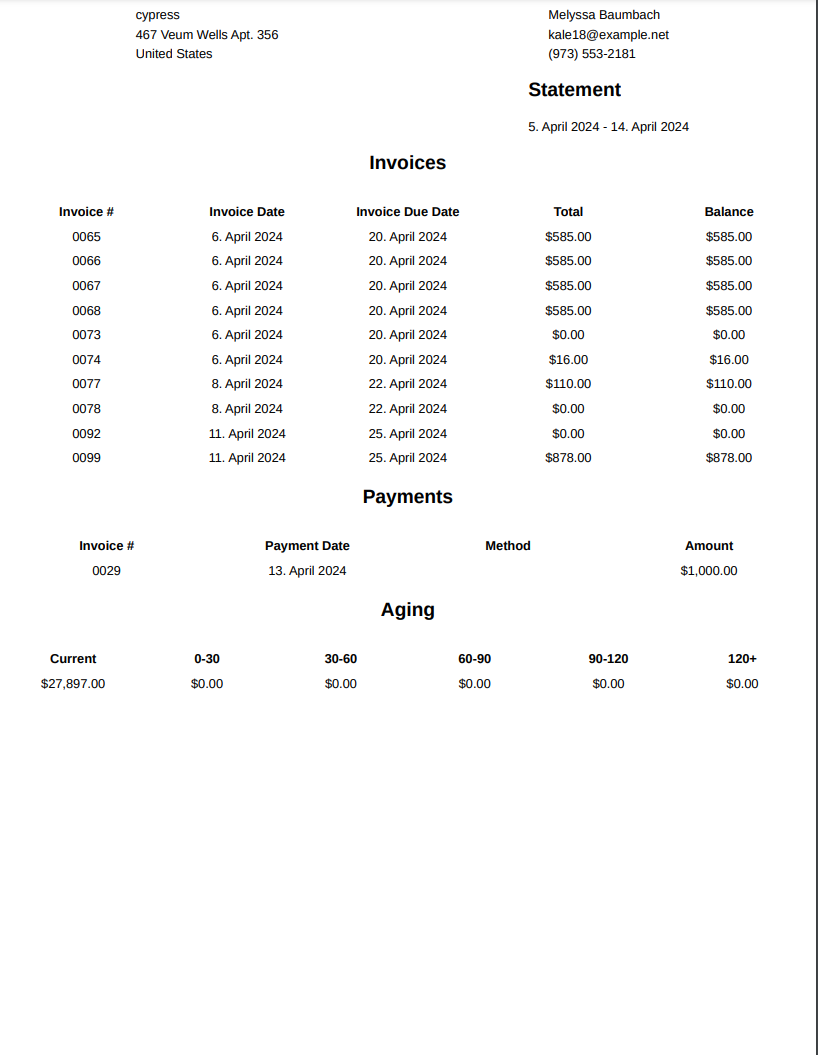 | Download |
| TS2 | Color Statement | 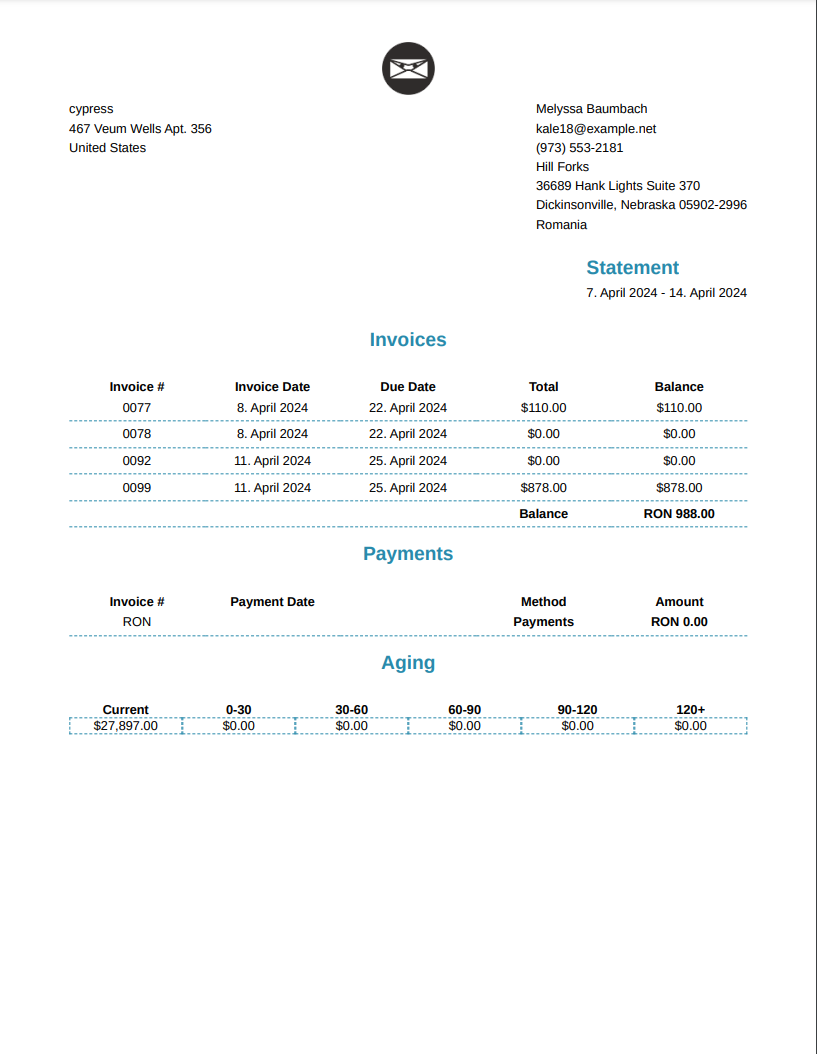 | Download |
| TS3 | Vertical Statement | 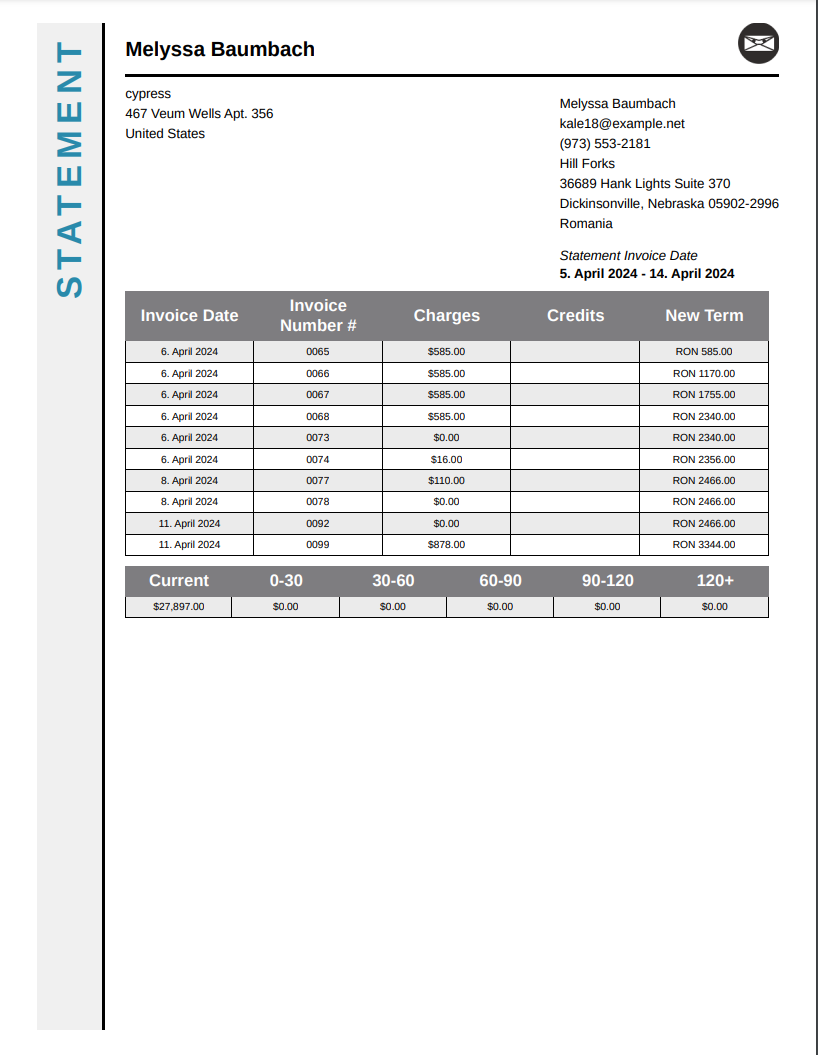 | Download |
| TS4 | Logo Statement | 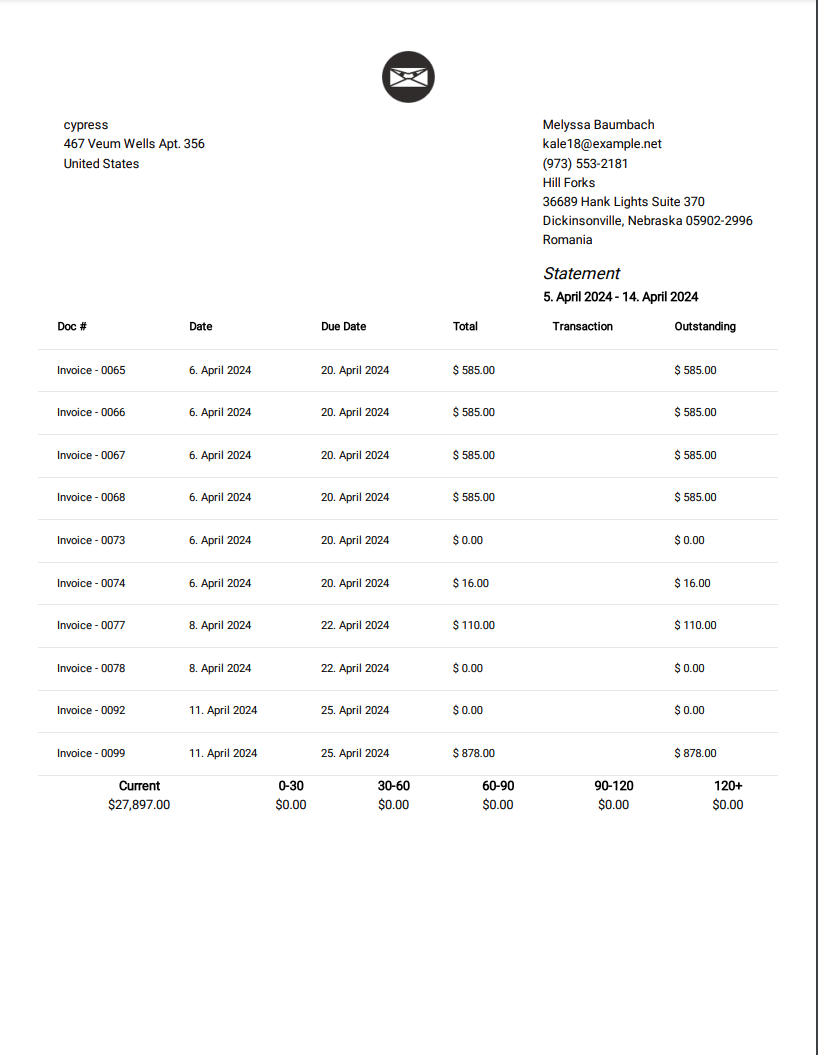 | Download |
Delivery Notes
| Name | Description | Preview | |
|---|---|---|---|
| TD4 | 3 Column | 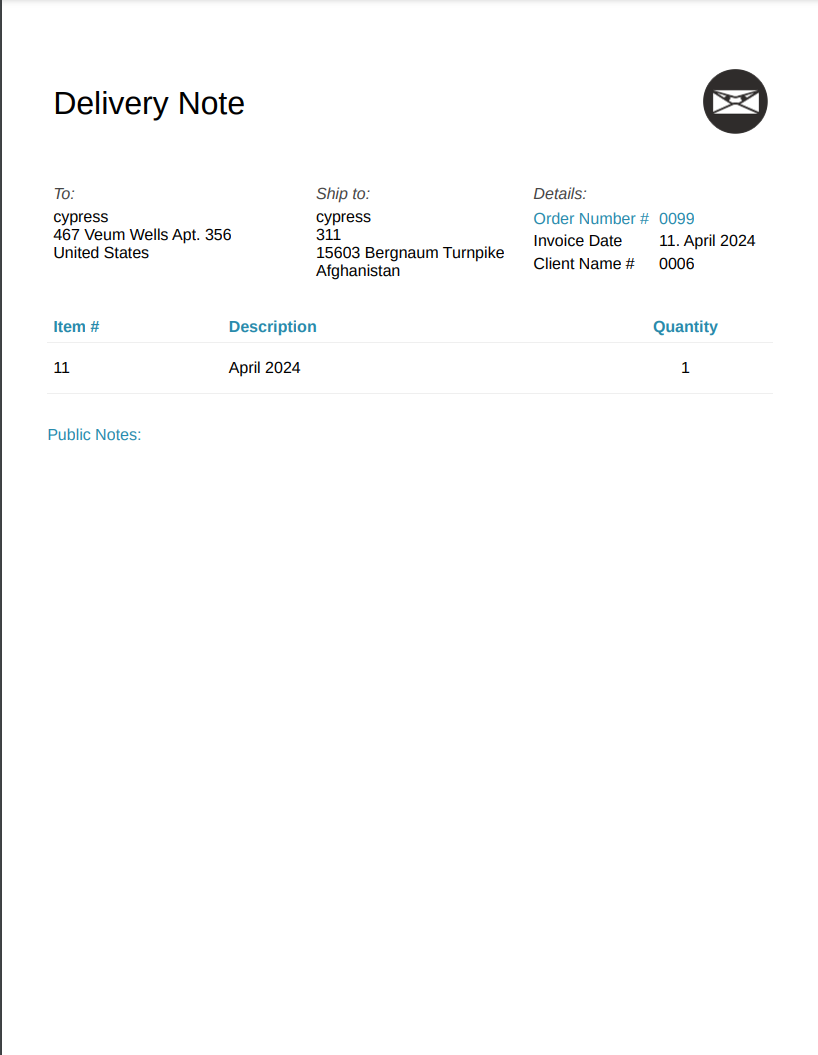 | Download |
| TD5 | 2 Column / Footer | 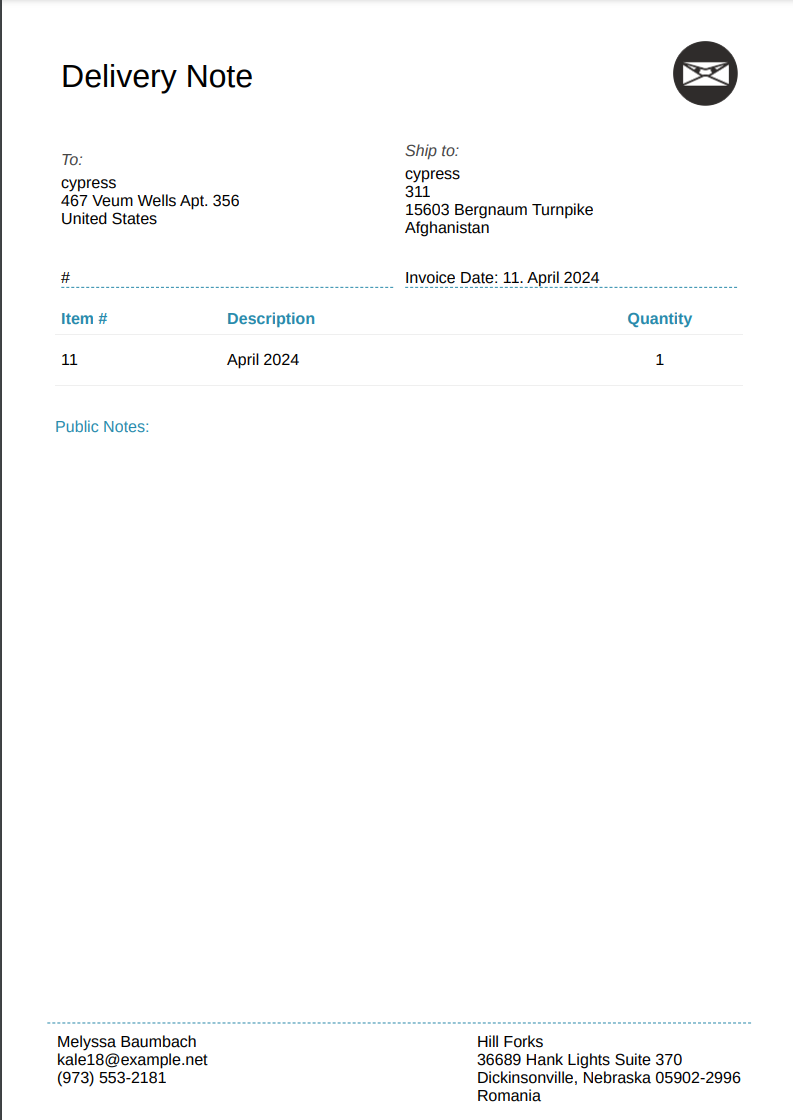 | Download |
| TD12 | 2 Column | 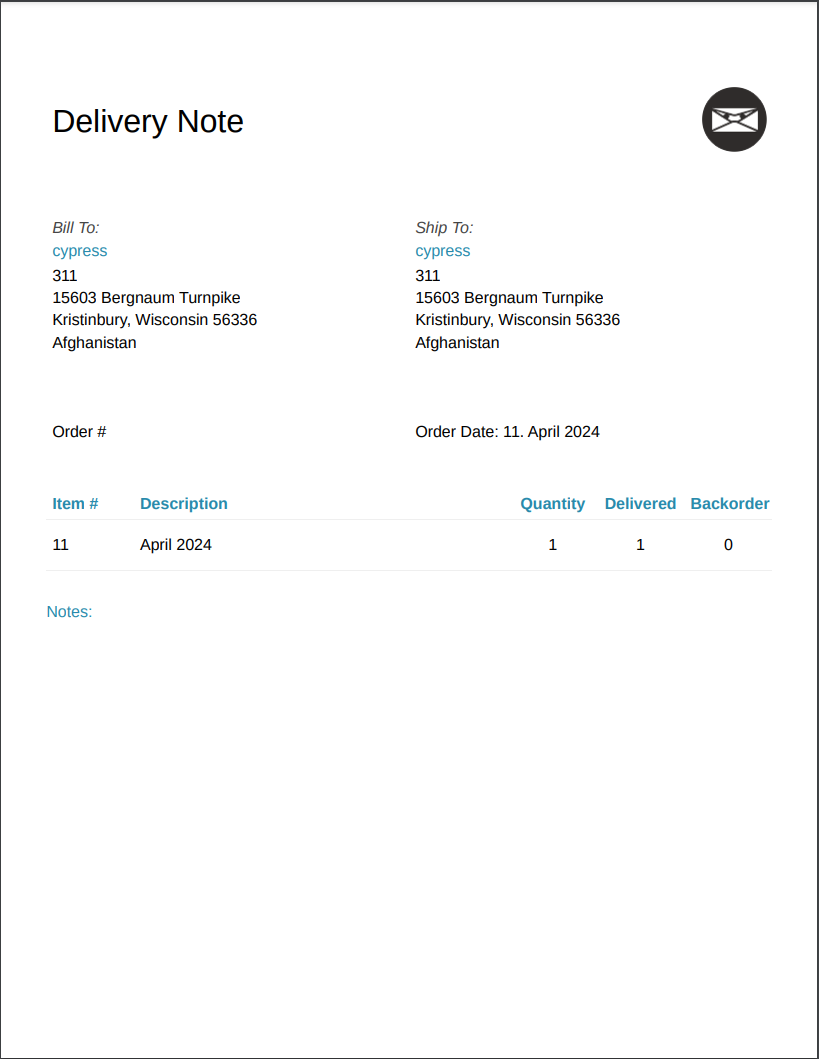 | Download |
| TD13 | 2 Column Mono | 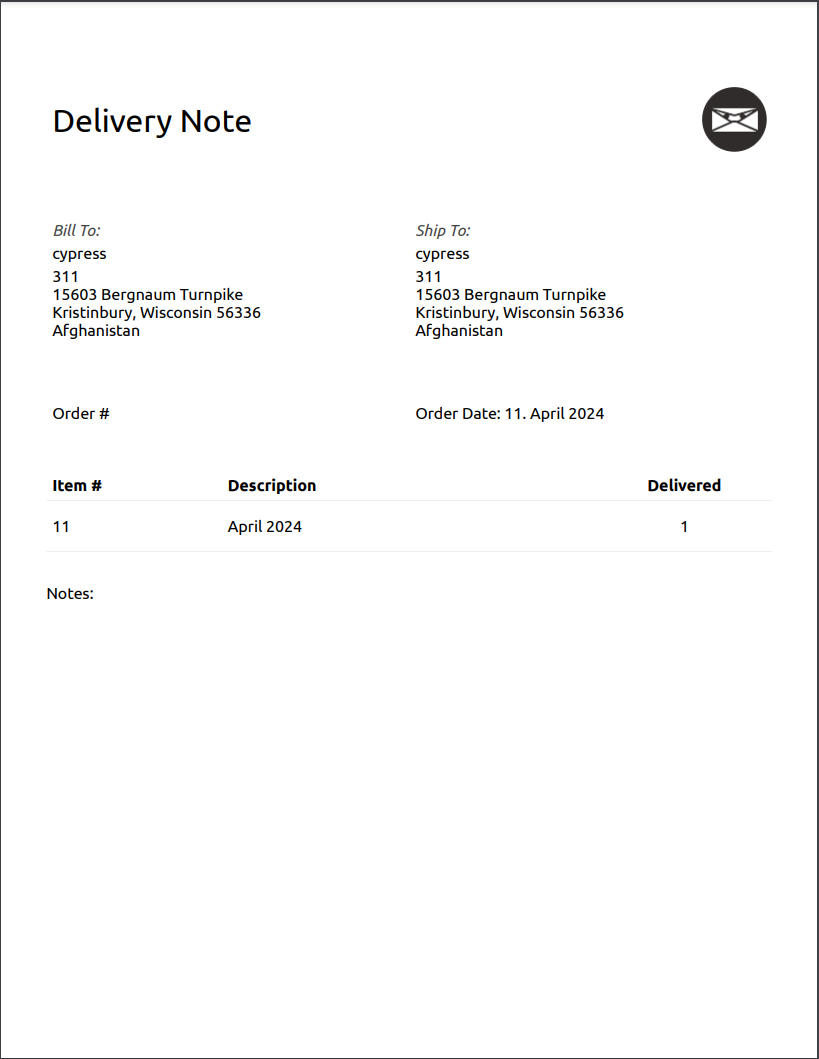 | Download |
Payment Receipts
| Name | Description | Preview | |
|---|---|---|---|
| TP6 | Standard | 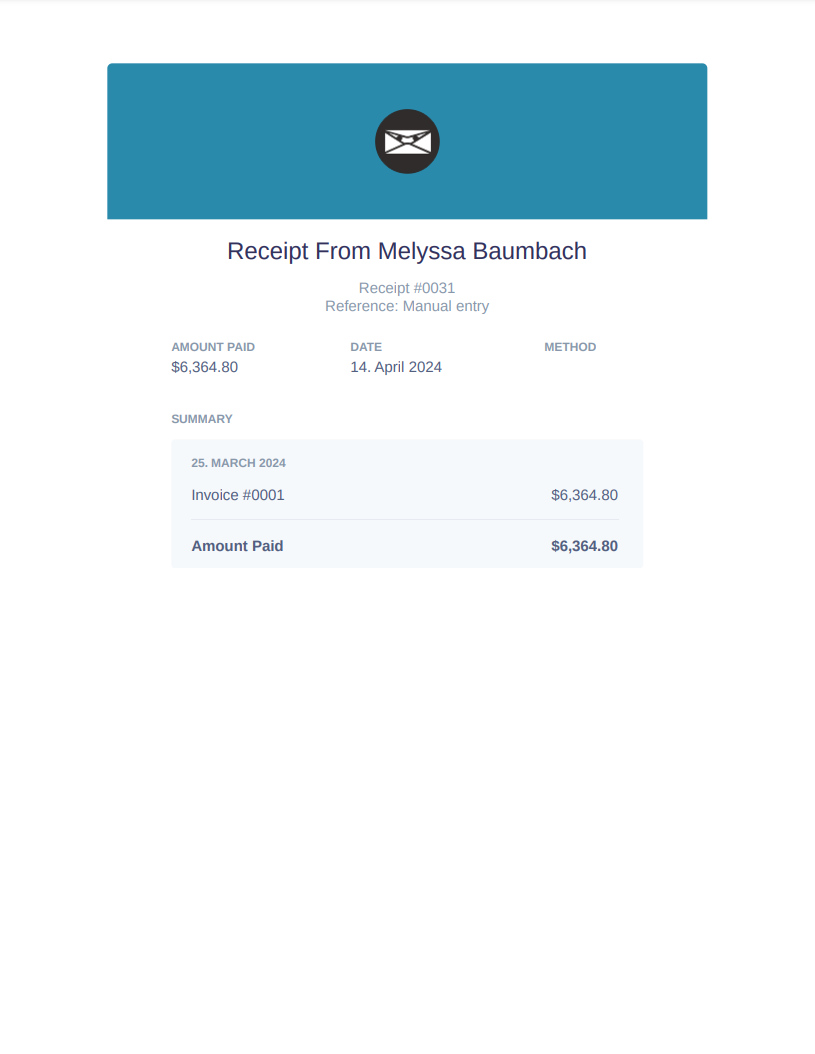 | Download |
| TP7 | Horizontal | 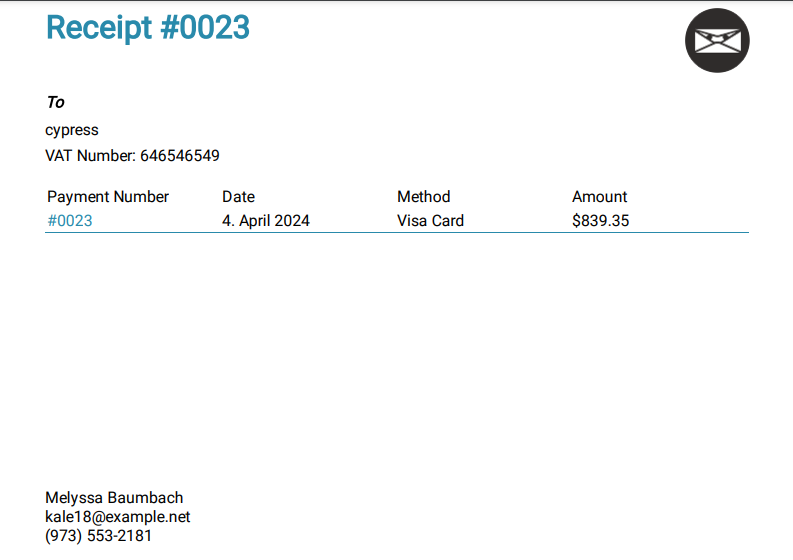 | Download |
Refund Receipts
| Name | Description | Preview | |
|---|---|---|---|
| TR8 | Horizontal | 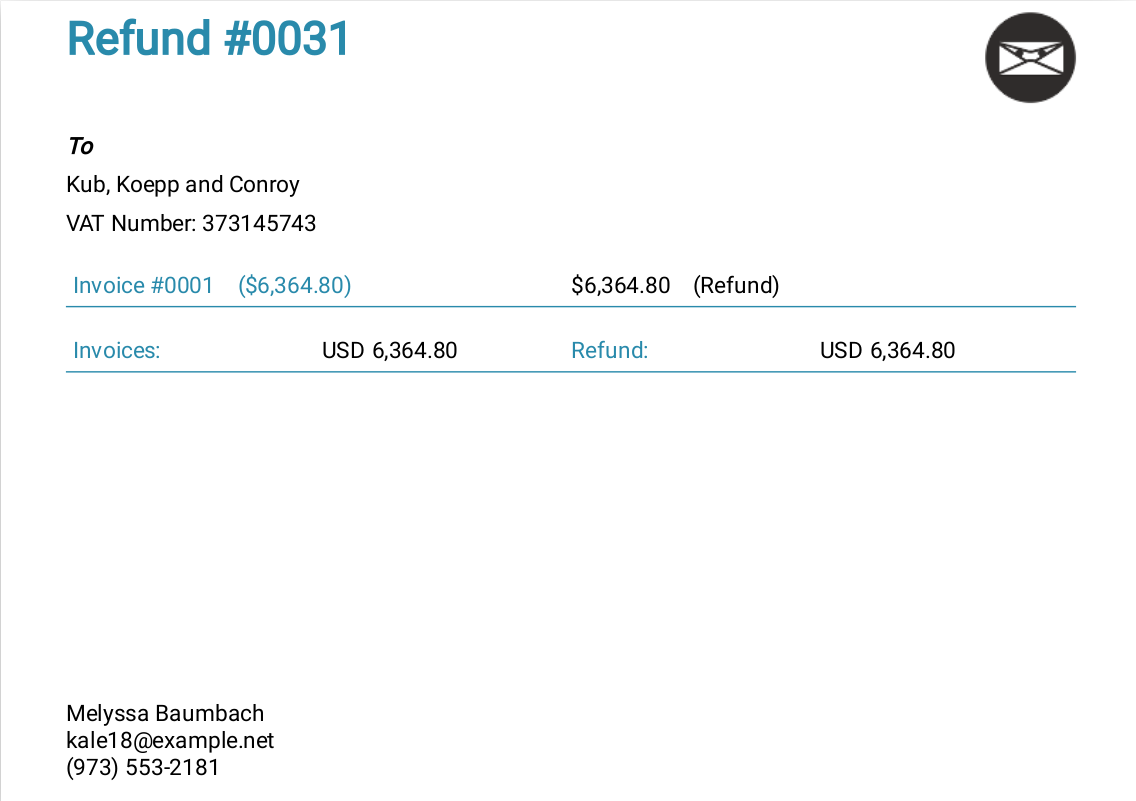 | Download |
| TR9 | Standard | 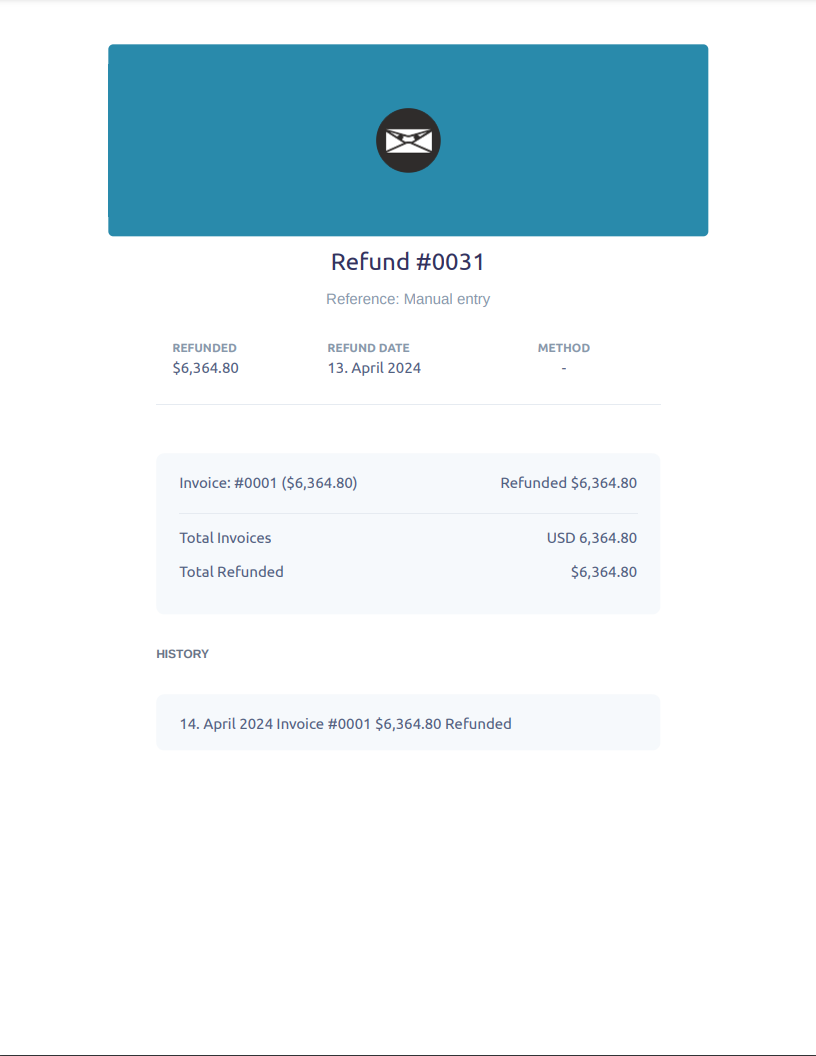 | Download |
Project/Tasks
| Name | Description | Preview | |
|---|---|---|---|
| TP11 | Project Outline | 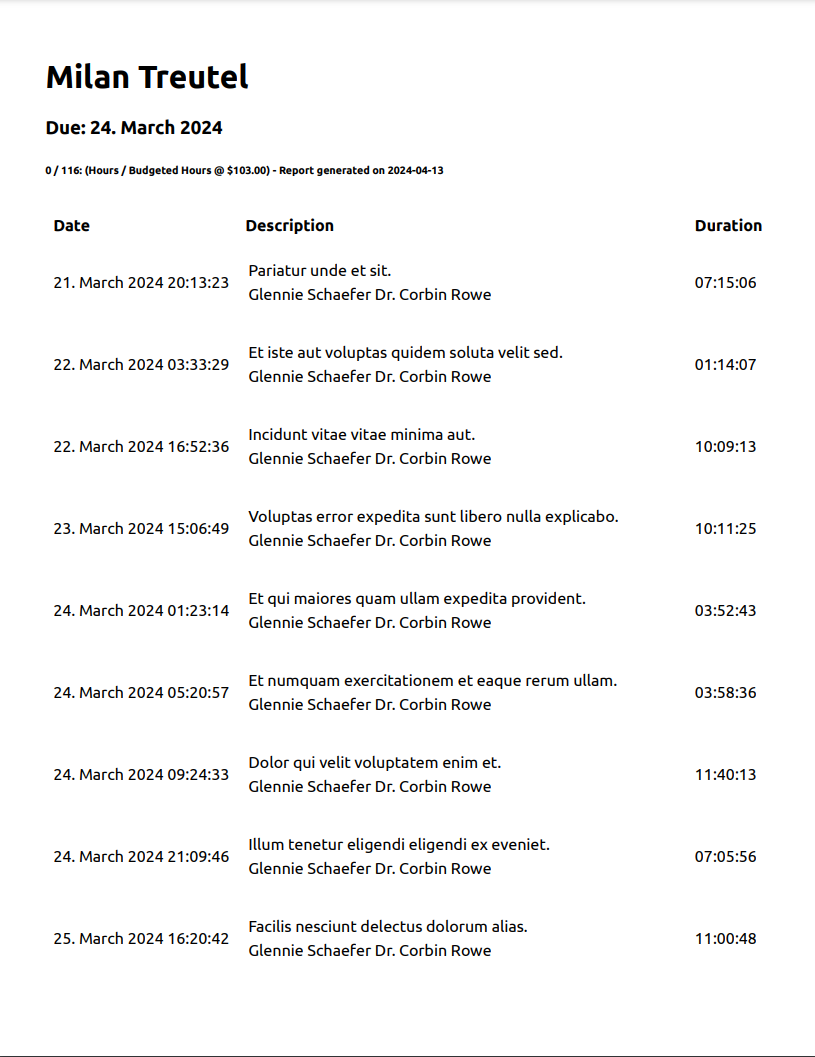 | Download |
| TT10 | Task | 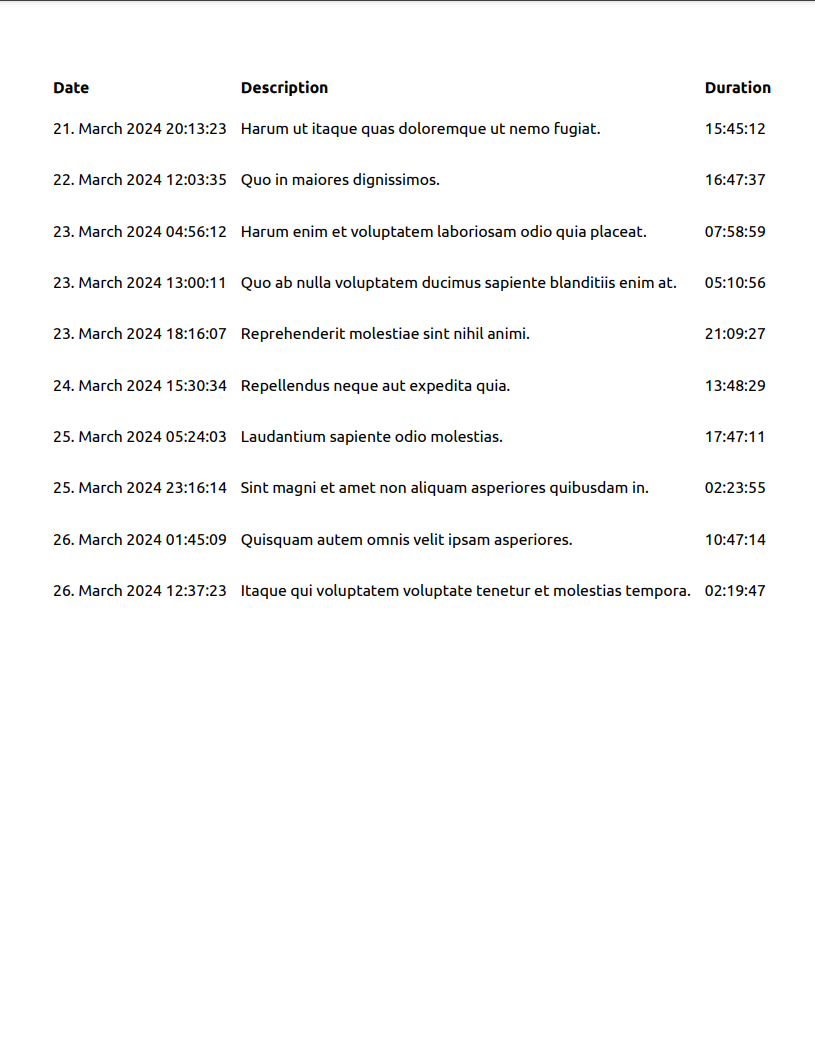 | Download |
Snippets
Here are some quick and easy snippets you can use in your templates/designs. Each snippet shows the CSS to add to the Includes section and the HTML/Twig to add to the Body section of your design.
All Twig code must be wrapped in <ninja></ninja> tags. Place these blocks in the Body section of your design.
1. Task Subtotal on Invoice
Calculate and display a subtotal for task/service line items only.
Add to Includes Tab:
.task_totals_container {
    margin-top: 0rem;
    display: grid;
    grid-template-columns: 2fr 1fr;
    padding-top: 0rem;
    padding-right: 1rem;
    gap: 80px;
    page-break-inside: auto;
    overflow: visible !important;
}

.task_totals {
    margin-top: 1rem;
    margin-bottom: 1rem;
    font-weight: bold;
    display: grid;
    grid-template-columns: 1fr 1fr;
}

.task_totals div:nth-child(odd) {
    text-align: left;
}

.task_totals div:nth-child(even) {
    text-align: right;
}
Add to Body Tab (after <table id="task-table" ...></table>):
<ninja>
{% if invoices is defined and invoices is not empty %}
    {% set invoice = invoices|first %}
    {% set task_subtotal = 0 %}
    {% for item in invoice.line_items|filter(item => item.type_id == 2) %}
        {% set task_subtotal = task_subtotal + item.gross_line_total_raw %}
    {% endfor %}

    <div class="task_totals_container">
        <div></div>
        <div class="task_totals">
            <div>Subtotal</div>
            <div>{{ task_subtotal|format_currency('USD') }}</div>
        </div>
    </div>
{% endif %}
</ninja>
2. Product Subtotal on Invoice
Same concept as the task subtotal, but filtering for product line items (type_id == 1). Place this after the <table id="product-table"> element.
Add to Includes:
.product_totals_container {
    margin-top: 0rem;
    display: grid;
    grid-template-columns: 2fr 1fr;
    padding-right: 1rem;
    gap: 80px;
    page-break-inside: auto;
    overflow: visible !important;
}

.product_totals {
    margin-top: 1rem;
    margin-bottom: 1rem;
    font-weight: bold;
    display: grid;
    grid-template-columns: 1fr 1fr;
}

.product_totals div:nth-child(odd) {
    text-align: left;
}

.product_totals div:nth-child(even) {
    text-align: right;
}
Add to Body (after <table id="product-table" ...></table>):
<ninja>
{% if invoices is defined and invoices is not empty %}
    {% set invoice = invoices|first %}
    {% set product_subtotal = 0 %}
    {% for item in invoice.line_items|filter(item => item.type_id == 1) %}
        {% set product_subtotal = product_subtotal + item.line_total_raw %}
    {% endfor %}

    <div class="product_totals_container">
        <div></div>
        <div class="product_totals">
            <div>Product Subtotal</div>
            <div>{{ product_subtotal|format_currency('USD') }}</div>
        </div>
    </div>
{% endif %}
</ninja>
3. Separate Products and Tasks into Distinct Tables
When an invoice contains both products and services, render them in two separate custom tables with individual subtotals. This replaces the default product and task tables — you can hide them via CSS if needed.
Add to Includes:
.custom-table {
    width: 100%;
    border-collapse: collapse;
    margin-bottom: 1.5rem;
}

.custom-table th {
    background-color: #f8f8f8;
    border-bottom: 2px solid #333;
    padding: 8px;
    text-align: left;
    font-weight: bold;
}

.custom-table td {
    padding: 8px;
    border-bottom: 1px solid #ddd;
}

.custom-table .subtotal-row td {
    font-weight: bold;
    border-top: 2px solid #333;
    border-bottom: none;
}

.section-title {
    font-size: 1.1rem;
    font-weight: bold;
    margin-top: 1.5rem;
    margin-bottom: 0.5rem;
    color: #333;
}

.text-right {
    text-align: right;
}
Add to Body:
<ninja>
{% if invoices is defined and invoices is not empty %}
    {% set invoice = invoices|first %}

    {% set products = invoice.line_items|filter(item => item.type_id == 1) %}
    {% set tasks = invoice.line_items|filter(item => item.type_id == 2) %}

    {% if products|length > 0 %}
    <div class="section-title">Products</div>
    <table class="custom-table">
        <thead>
            <tr>
                <th>Item</th>
                <th>Description</th>
                <th class="text-right">Unit Cost</th>
                <th class="text-right">Qty</th>
                <th class="text-right">Line Total</th>
            </tr>
        </thead>
        <tbody>
            {% set product_subtotal = 0 %}
            {% for item in products %}
            <tr>
                <td>{{ item.product_key }}</td>
                <td>{{ item.notes }}</td>
                <td class="text-right">{{ item.cost }}</td>
                <td class="text-right">{{ item.quantity }}</td>
                <td class="text-right">{{ item.line_total }}</td>
            </tr>
            {% set product_subtotal = product_subtotal + item.line_total_raw %}
            {% endfor %}
            <tr class="subtotal-row">
                <td colspan="4" class="text-right">Product Subtotal</td>
                <td class="text-right">{{ product_subtotal|format_currency('USD') }}</td>
            </tr>
        </tbody>
    </table>
    {% endif %}

    {% if tasks|length > 0 %}
    <div class="section-title">Services</div>
    <table class="custom-table">
        <thead>
            <tr>
                <th>Service</th>
                <th>Description</th>
                <th class="text-right">Rate</th>
                <th class="text-right">Hours</th>
                <th class="text-right">Line Total</th>
            </tr>
        </thead>
        <tbody>
            {% set task_subtotal = 0 %}
            {% for item in tasks %}
            <tr>
                <td>{{ item.product_key }}</td>
                <td>{{ item.notes }}</td>
                <td class="text-right">{{ item.cost }}</td>
                <td class="text-right">{{ item.quantity }}</td>
                <td class="text-right">{{ item.line_total }}</td>
            </tr>
            {% set task_subtotal = task_subtotal + item.line_total_raw %}
            {% endfor %}
            <tr class="subtotal-row">
                <td colspan="4" class="text-right">Service Subtotal</td>
                <td class="text-right">{{ task_subtotal|format_currency('USD') }}</td>
            </tr>
        </tbody>
    </table>
    {% endif %}

{% endif %}
</ninja>
4. Conditional "PAID" / "OVERDUE" Watermark Stamp
Overlay a rotated stamp on the invoice based on its payment status. This uses the balance_raw field to determine if the invoice is fully paid.
Add to Includes:
.stamp {
    position: fixed;
    top: 35%;
    left: 25%;
    font-size: 6rem;
    font-weight: bold;
    text-transform: uppercase;
    letter-spacing: 0.2em;
    transform: rotate(-30deg);
    opacity: 0.12;
    pointer-events: none;
    z-index: 9999;
}

.stamp-paid {
    color: #2e7d32;
    border: 8px solid #2e7d32;
    padding: 10px 30px;
    border-radius: 12px;
}

.stamp-overdue {
    color: #c62828;
    border: 8px solid #c62828;
    padding: 10px 30px;
    border-radius: 12px;
}
Add to Body (at the top, before other content):
<ninja>
{% if invoices is defined and invoices is not empty %}
    {% set invoice = invoices|first %}

    {% if invoice.balance_raw == 0 %}
        <div class="stamp stamp-paid">PAID</div>
    {% elseif invoice.due_date is not empty and invoice.status_id != 1 %}
        <div class="stamp stamp-overdue">OVERDUE</div>
    {% endif %}
{% endif %}
</ninja>
5. Dynamic Payment Instructions Based on Balance
Show bank transfer details when there is an outstanding balance, or a thank you message when the invoice is paid. Place this in the footer area of your design.
Add to Body:
<ninja>
{% if invoices is defined and invoices is not empty %}
    {% set invoice = invoices|first %}

    {% if invoice.balance_raw > 0 %}
    <div style="margin-top: 2rem; padding: 1rem; border: 1px solid #ddd; border-radius: 4px; background: #f9f9f9;">
        <strong>Payment Instructions</strong>
        <p>Please remit payment of {{ invoice.balance }} to:</p>
        <table style="margin-top: 0.5rem;">
            <tr><td style="padding-right: 1rem;">Bank:</td><td>First National Bank</td></tr>
            <tr><td style="padding-right: 1rem;">Account Name:</td><td>Your Company LLC</td></tr>
            <tr><td style="padding-right: 1rem;">Account Number:</td><td>1234567890</td></tr>
            <tr><td style="padding-right: 1rem;">Routing Number:</td><td>021000021</td></tr>
            <tr><td style="padding-right: 1rem;">Reference:</td><td>Invoice #{{ invoice.number }}</td></tr>
        </table>
    </div>
    {% else %}
    <div style="margin-top: 2rem; padding: 1rem; text-align: center; color: #2e7d32;">
        <strong>Payment received — thank you for your business!</strong>
    </div>
    {% endif %}
{% endif %}
</ninja>
7. Line Item Grouping with Category Headers
Group line items by a custom value (e.g., custom_value1 used as a category). This inserts a header row each time the category changes. Ensure your line items are sorted by custom_value1 for best results.
Add to Includes:
.grouped-table {
    width: 100%;
    border-collapse: collapse;
    margin-bottom: 1.5rem;
}

.grouped-table th {
    background-color: #f0f0f0;
    padding: 8px;
    text-align: left;
    border-bottom: 2px solid #333;
}

.grouped-table td {
    padding: 8px;
    border-bottom: 1px solid #ddd;
}

.group-header td {
    background-color: #e8e8e8;
    font-weight: bold;
    font-size: 0.95rem;
    padding: 6px 8px;
    border-bottom: 1px solid #999;
}

.text-right {
    text-align: right;
}
Add to Body:
<ninja>
{% if invoices is defined and invoices is not empty %}
    {% set invoice = invoices|first %}
    {% set current_group = '' %}

    <table class="grouped-table">
        <thead>
            <tr>
                <th>Item</th>
                <th>Description</th>
                <th class="text-right">Qty</th>
                <th class="text-right">Unit Cost</th>
                <th class="text-right">Total</th>
            </tr>
        </thead>
        <tbody>
        {% for item in invoice.line_items|filter(item => item.type_id == 1) %}
            {% if item.custom_value1 != current_group %}
                {% set current_group = item.custom_value1 %}
                <tr class="group-header">
                    <td colspan="5">{{ current_group|upper }}</td>
                </tr>
            {% endif %}
            <tr>
                <td>{{ item.product_key }}</td>
                <td>{{ item.notes }}</td>
                <td class="text-right">{{ item.quantity }}</td>
                <td class="text-right">{{ item.cost }}</td>
                <td class="text-right">{{ item.line_total }}</td>
            </tr>
        {% endfor %}
        </tbody>
    </table>
{% endif %}
</ninja>
9. Running Line Item Counter / Row Numbering
Add sequential row numbers to your line items using Twig's built-in loop.index variable.
Add to Includes:
.numbered-table {
    width: 100%;
    border-collapse: collapse;
}

.numbered-table th, .numbered-table td {
    padding: 8px;
    border-bottom: 1px solid #ddd;
}

.numbered-table th {
    background-color: #f0f0f0;
    border-bottom: 2px solid #333;
    text-align: left;
}

.row-number {
    width: 40px;
    text-align: center;
    color: #888;
}

.text-right {
    text-align: right;
}
Add to Body:
<ninja>
{% if invoices is defined and invoices is not empty %}
    {% set invoice = invoices|first %}

    <table class="numbered-table">
        <thead>
            <tr>
                <th class="row-number">#</th>
                <th>Item</th>
                <th>Description</th>
                <th class="text-right">Qty</th>
                <th class="text-right">Unit Cost</th>
                <th class="text-right">Total</th>
            </tr>
        </thead>
        <tbody>
        {% for item in invoice.line_items %}
            <tr>
                <td class="row-number">{{ loop.index }}</td>
                <td>{{ item.product_key }}</td>
                <td>{{ item.notes }}</td>
                <td class="text-right">{{ item.quantity }}</td>
                <td class="text-right">{{ item.cost }}</td>
                <td class="text-right">{{ item.line_total }}</td>
            </tr>
        {% endfor %}
        </tbody>
    </table>
{% endif %}
</ninja>
10. Client Outstanding Balance Banner
Display a prominent banner at the top of the invoice showing the client's total outstanding balance across all invoices.
Add to Includes:
.balance-banner {
    background-color: #fff3e0;
    border: 1px solid #ff9800;
    border-radius: 4px;
    padding: 10px 16px;
    margin-bottom: 1.5rem;
    font-size: 0.9rem;
    color: #e65100;
}

.balance-banner strong {
    font-size: 1rem;
}
Add to Body (at the top of your design):
<ninja>
{% if invoices is defined and invoices is not empty %}
    {% set invoice = invoices|first %}

    {% if invoice.client.balance > invoice.amount_raw %}
    <div class="balance-banner">
        <strong>Account Notice:</strong>
        Your total outstanding balance is {{ invoice.client.balance|format_currency('USD') }}.
        This invoice ({{ invoice.number }}) accounts for {{ invoice.amount }} of that total.
    </div>
    {% endif %}
{% endif %}
</ninja>
12. Enhanced Payment History Table
An improved version of the basic payments table that includes payment method, transaction reference, and refund details.
Add to Includes:
.payment-history {
    width: 100%;
    border-collapse: collapse;
    margin-top: 1.5rem;
    font-size: 0.9rem;
}

.payment-history th {
    background-color: #f0f0f0;
    border-bottom: 2px solid #333;
    padding: 8px;
    text-align: left;
}

.payment-history td {
    padding: 8px;
    border-bottom: 1px solid #ddd;
}

.payment-history .refund-row td {
    color: #c62828;
    font-style: italic;
    padding-left: 2rem;
    border-bottom: 1px dotted #ddd;
}

.payment-section-title {
    font-size: 1rem;
    font-weight: bold;
    margin-top: 2rem;
    margin-bottom: 0.5rem;
}

.text-right {
    text-align: right;
}
Add to Body:
<ninja>
{% if invoices is defined and invoices is not empty %}
    {% set invoice = invoices|first %}

    {% if invoice.payments is not empty %}
    <div class="payment-section-title">Payment History</div>
    <table class="payment-history">
        <thead>
            <tr>
                <th>Date</th>
                <th>Number</th>
                <th>Method</th>
                <th>Reference</th>
                <th class="text-right">Amount</th>
                <th>Status</th>
            </tr>
        </thead>
        <tbody>
        {% for payment in invoice.payments %}
            <tr>
                <td>{{ payment.date }}</td>
                <td>{{ payment.number }}</td>
                <td>{{ payment.method }}</td>
                <td>{{ payment.transaction_reference }}</td>
                <td class="text-right">{{ payment.amount }}</td>
                <td>{{ payment.status }}</td>
            </tr>

            {% if payment.refund_activity is not empty %}
                {% for refund in payment.refund_activity %}
                <tr class="refund-row">
                    <td colspan="6">↳ {{ refund }}</td>
                </tr>
                {% endfor %}
            {% endif %}
        {% endfor %}
        </tbody>
    </table>
    {% endif %}
{% endif %}
</ninja>
13. Discount Summary
When the invoice has a discount applied, display a summary showing the discount details prominently.
Add to Includes:
.discount-summary {
    margin-top: 1rem;
    padding: 10px 16px;
    background-color: #e8f5e9;
    border: 1px solid #4caf50;
    border-radius: 4px;
    display: grid;
    grid-template-columns: 1fr 1fr;
    gap: 4px;
    font-size: 0.9rem;
}

.discount-summary .label {
    font-weight: bold;
}

.discount-summary .value {
    text-align: right;
}
Add to Body:
<ninja>
{% if invoices is defined and invoices is not empty %}
    {% set invoice = invoices|first %}

    {% if invoice.discount > 0 %}
    <div class="discount-summary">
        <div class="label">Discount Applied:</div>
        <div class="value">
            {% if invoice.is_amount_discount %}
                {{ invoice.discount|format_currency('USD') }} off
            {% else %}
                {{ invoice.discount }}% off
            {% endif %}
        </div>
        <div class="label">Amount Before Discount:</div>
        <div class="value">
            {% set line_sum = 0 %}
            {% for item in invoice.line_items %}
                {% set line_sum = line_sum + item.line_total_raw %}
            {% endfor %}
            {{ line_sum|format_currency('USD') }}
        </div>
        <div class="label">You Save:</div>
        <div class="value">
            {% if invoice.is_amount_discount %}
                {{ invoice.discount|format_currency('USD') }}
            {% else %}
                {{ (line_sum * invoice.discount / 100)|format_currency('USD') }}
            {% endif %}
        </div>
    </div>
    {% endif %}
{% endif %}
</ninja>
15. Custom Footer with Conditional Bank Details
Show different bank account details based on the client's currency. Useful for businesses that hold accounts in multiple currencies.
Add to Body (in the footer area):
<ninja>
{% if invoices is defined and invoices is not empty %}
    {% set invoice = invoices|first %}

    <div style="margin-top: 2rem; padding: 1rem; border-top: 2px solid #333; font-size: 0.85rem;">
        <strong>Bank Details for Payment</strong>

        {% if invoice.client.currency == 'EUR' %}
        <table style="margin-top: 0.5rem;">
            <tr><td style="padding-right: 1rem;">Bank:</td><td>Deutsche Bank</td></tr>
            <tr><td style="padding-right: 1rem;">IBAN:</td><td>DE89 3704 0044 0532 0130 00</td></tr>
            <tr><td style="padding-right: 1rem;">BIC/SWIFT:</td><td>COBADEFFXXX</td></tr>
            <tr><td style="padding-right: 1rem;">Reference:</td><td>{{ invoice.number }}</td></tr>
        </table>

        {% elseif invoice.client.currency == 'GBP' %}
        <table style="margin-top: 0.5rem;">
            <tr><td style="padding-right: 1rem;">Bank:</td><td>Barclays</td></tr>
            <tr><td style="padding-right: 1rem;">Sort Code:</td><td>20-00-00</td></tr>
            <tr><td style="padding-right: 1rem;">Account:</td><td>12345678</td></tr>
            <tr><td style="padding-right: 1rem;">Reference:</td><td>{{ invoice.number }}</td></tr>
        </table>

        {% else %}
        <table style="margin-top: 0.5rem;">
            <tr><td style="padding-right: 1rem;">Bank:</td><td>First National Bank</td></tr>
            <tr><td style="padding-right: 1rem;">Account:</td><td>1234567890</td></tr>
            <tr><td style="padding-right: 1rem;">Routing:</td><td>021000021</td></tr>
            <tr><td style="padding-right: 1rem;">Reference:</td><td>{{ invoice.number }}</td></tr>
        </table>
        {% endif %}

        <p style="margin-top: 0.5rem; color: #666;">
            Please include invoice number <strong>{{ invoice.number }}</strong> as payment reference.
        </p>
    </div>
{% endif %}
</ninja>
Full Design Examples
These are complete, ready-to-use designs that demonstrate the full power of the Twig templating engine. You can import these directly into Settings > Invoice Design > Custom Designs.
Professional Invoice with Mixed Line Items
A complete invoice design that separates products from services, includes a tax breakdown, payment history, and conditional paid/overdue styling.
<!DOCTYPE html>
<html lang="en">
<head>
    <meta charset="UTF-8">
    <meta name="viewport" content="width=device-width, initial-scale=1.0">
    <title>Invoice</title>
    <style>
        :root {
            --primary-color: #2c3e50;
            --accent-color: #3498db;
            --border-color: #ddd;
            --bg-light: #f8f9fa;
            --text-muted: #6c757d;
            --success: #27ae60;
            --danger: #e74c3c;
        }

        body {
            font-family: 'Helvetica Neue', Arial, sans-serif;
            font-size: 13px;
            color: #333;
            line-height: 1.5;
        }

        .invoice-header {
            display: grid;
            grid-template-columns: 1fr 1fr;
            margin-bottom: 2rem;
            padding-bottom: 1rem;
            border-bottom: 3px solid var(--primary-color);
        }

        .invoice-title {
            font-size: 2rem;
            font-weight: bold;
            color: var(--primary-color);
            margin-bottom: 0.25rem;
        }

        .invoice-number {
            font-size: 1rem;
            color: var(--text-muted);
        }

        .details-grid {
            display: grid;
            grid-template-columns: 1fr 1fr 1fr;
            gap: 1.5rem;
            margin-bottom: 2rem;
        }

        .details-box h4 {
            font-size: 0.75rem;
            text-transform: uppercase;
            letter-spacing: 0.05em;
            color: var(--text-muted);
            margin-bottom: 0.5rem;
            border-bottom: 1px solid var(--border-color);
            padding-bottom: 4px;
        }

        .details-box p {
            margin: 2px 0;
            font-size: 0.85rem;
        }

        .items-table {
            width: 100%;
            border-collapse: collapse;
            margin-bottom: 0.5rem;
        }

        .items-table th {
            background-color: var(--primary-color);
            color: white;
            padding: 8px 10px;
            text-align: left;
            font-size: 0.8rem;
            text-transform: uppercase;
            letter-spacing: 0.03em;
        }

        .items-table td {
            padding: 8px 10px;
            border-bottom: 1px solid var(--border-color);
        }

        .items-table tbody tr:nth-child(even) {
            background-color: var(--bg-light);
        }

        .items-table .subtotal-row td {
            font-weight: bold;
            border-top: 2px solid var(--primary-color);
            border-bottom: none;
            background-color: transparent;
        }

        .section-label {
            font-size: 1rem;
            font-weight: bold;
            color: var(--primary-color);
            margin-top: 1.5rem;
            margin-bottom: 0.5rem;
            padding-bottom: 4px;
            border-bottom: 1px solid var(--accent-color);
        }

        .totals-container {
            display: grid;
            grid-template-columns: 1.5fr 1fr;
            gap: 2rem;
            margin-top: 1rem;
        }

        .totals-table {
            width: 100%;
            border-collapse: collapse;
        }

        .totals-table td {
            padding: 6px 10px;
        }

        .totals-table .total-row {
            font-size: 1.1rem;
            font-weight: bold;
            border-top: 2px solid var(--primary-color);
        }

        .totals-table .label {
            text-align: left;
            color: var(--text-muted);
        }

        .totals-table .value {
            text-align: right;
        }

        .text-right {
            text-align: right;
        }

        .payment-table {
            width: 100%;
            border-collapse: collapse;
            font-size: 0.85rem;
            margin-top: 0.5rem;
        }

        .payment-table th {
            background-color: var(--bg-light);
            padding: 6px 10px;
            text-align: left;
            border-bottom: 1px solid var(--border-color);
        }

        .payment-table td {
            padding: 6px 10px;
            border-bottom: 1px solid var(--border-color);
        }

        .tax-table {
            width: 100%;
            border-collapse: collapse;
            font-size: 0.85rem;
        }

        .tax-table td {
            padding: 4px 10px;
        }

        .stamp {
            position: fixed;
            top: 35%;
            left: 25%;
            font-size: 6rem;
            font-weight: bold;
            text-transform: uppercase;
            letter-spacing: 0.2em;
            transform: rotate(-30deg);
            opacity: 0.1;
            pointer-events: none;
            z-index: 9999;
            border: 8px solid;
            padding: 10px 30px;
            border-radius: 12px;
        }

        .stamp-paid { color: var(--success); border-color: var(--success); }
        .stamp-overdue { color: var(--danger); border-color: var(--danger); }

        .invoice-footer {
            margin-top: 2rem;
            padding-top: 1rem;
            border-top: 1px solid var(--border-color);
            font-size: 0.8rem;
            color: var(--text-muted);
        }
    </style>
</head>
<body>
<ninja>
{% if invoices is defined and invoices is not empty %}
{% set invoice = invoices|first %}

{% if invoice.balance_raw == 0 %}
    <div class="stamp stamp-paid">PAID</div>
{% endif %}

<div class="invoice-header">
    <div>
        <div id="company-details"></div>
    </div>
    <div style="text-align: right;">
        <div class="invoice-title">INVOICE</div>
        <div class="invoice-number">#{{ invoice.number }}</div>
    </div>
</div>

<div class="details-grid">
    <div class="details-box">
        <h4>Bill To</h4>
        <div id="client-details"></div>
    </div>
    <div class="details-box">
        <h4>Ship To</h4>
        <div id="shipping-address"></div>
    </div>
    <div class="details-box">
        <h4>Invoice Details</h4>
        <p><strong>Invoice Date:</strong> {{ invoice.date }}</p>
        <p><strong>Due Date:</strong> {{ invoice.due_date }}</p>
        <p><strong>PO Number:</strong> {{ invoice.po_number }}</p>
        <p><strong>Status:</strong> {{ invoice.status }}</p>
    </div>
</div>

{% set products = invoice.line_items|filter(item => item.type_id == '1') %}
{% set tasks = invoice.line_items|filter(item => item.type_id == '2') %}

{% if products|length > 0 %}
<div class="section-label">Products</div>
<table class="items-table">
    <thead>
        <tr>
            <th>Item</th>
            <th>Description</th>
            <th class="text-right">Unit Cost</th>
            <th class="text-right">Qty</th>
            <th class="text-right">Tax</th>
            <th class="text-right">Line Total</th>
        </tr>
    </thead>
    <tbody>
        {% set product_subtotal = 0 %}
        {% for item in products|filter(item => item.type_id == '1') %}
        <tr>
            <td>{{ item.product_key }}</td>
            <td>{{ item.notes }}</td>
            <td class="text-right">{{ item.cost }}</td>
            <td class="text-right">{{ item.quantity }}</td>
            <td class="text-right">{{ item.tax_amount }}</td>
            <td class="text-right">{{ item.line_total }}</td>
        </tr>
        {% set product_subtotal = product_subtotal + item.line_total_raw %}
        {% endfor %}
        <tr class="subtotal-row">
            <td colspan="5" class="text-right">Product Subtotal</td>
            <td class="text-right">{{ product_subtotal|format_currency('USD') }}</td>
        </tr>
    </tbody>
</table>
{% endif %}

{% if tasks|length > 0 %}
<div class="section-label">Services</div>
<table class="items-table">
    <thead>
        <tr>
            <th>Service</th>
            <th>Description</th>
            <th class="text-right">Rate</th>
            <th class="text-right">Hours</th>
            <th class="text-right">Tax</th>
            <th class="text-right">Line Total</th>
        </tr>
    </thead>
    <tbody>
        {% set task_subtotal = 0 %}
        {% for item in tasks|filter(item => item.type_id == '2') %}
        <tr>
            <td>{{ item.product_key }}</td>
            <td>{{ item.notes }}</td>
            <td class="text-right">{{ item.cost }}</td>
            <td class="text-right">{{ item.quantity }}</td>
            <td class="text-right">{{ item.tax_amount }}</td>
            <td class="text-right">{{ item.line_total }}</td>
        </tr>
        {% set task_subtotal = task_subtotal + item.line_total_raw %}
        {% endfor %}
        <tr class="subtotal-row">
            <td colspan="5" class="text-right">Service Subtotal</td>
            <td class="text-right">{{ task_subtotal|format_currency('USD') }}</td>
        </tr>
    </tbody>
</table>
{% endif %}

<div class="totals-container">
    <div>

    </div>
    <div>
        <table class="totals-table">
            <tr class="total-row">
                <td class="label">Subtotal</td>
                <td class="value">{{ invoice.amount }}</td>
            </tr>
            {% if invoice.discount_raw > 0 %}
            <tr>
                <td class="label">Discount
                    {% if invoice.is_amount_discount %}
                    {% else %}
                        ({{ invoice.discount }}%)
                    {% endif %}
                </td>
            </tr>
            {% endif %}
            <tr>
                <td class="label">Tax</td>
                <td class="value">{{ invoice.total_taxes }}</td>
            </tr>
            <tr class="total-row">
                <td class="label">Total</td>
                <td class="value">{{ invoice.amount }}</td>
            </tr>
            {% if invoice.paid_to_date != '$0.00' %}
            <tr>
                <td class="label">Paid to Date</td>
                <td class="value">{{ invoice.paid_to_date }}</td>
            </tr>
            {% endif %}
            <tr class="total-row">
                <td class="label">Balance Due</td>
                <td class="value">{{ invoice.balance }}</td>
            </tr>
        </table>
    </div>
</div>

{% if invoice.payments is not empty %}
<div class="section-label">Payments Received</div>
<table class="payment-table">
    <thead>
        <tr>
            <th>Date</th>
            <th>Number</th>
            <th>Amount</th>
            <th>Status</th>
        </tr>
    </thead>
    <tbody>
    {% for payment in invoice.payments %}
        <tr>
            <td>{{ payment.date }}</td>
            <td>{{ payment.number }}</td>
            <td>{{ payment.amount }}</td>
            <td>{{ payment.status }}</td>
        </tr>
    {% endfor %}
    </tbody>
</table>
{% endif %}

<div class="invoice-footer">
    {% if invoice.terms is not empty %}
    <p><strong>Terms:</strong> {{ invoice.terms }}</p>
    {% endif %}
    {% if invoice.footer is not empty %}
    <p>{{ invoice.footer }}</p>
    {% endif %}
    {% if invoice.public_notes is not empty %}
    <p>{{ invoice.public_notes }}</p>
    {% endif %}
</div>

{% endif %}
</ninja>
</body>
</html>
Detailed Timesheet Invoice
A task-focused invoice design that expands each service line item to show the associated task's time log entries including start/end times, descriptions, and durations. Ideal for agencies and freelancers billing by the hour.
<!DOCTYPE html>
<html lang="en">
<head>
    <meta charset="UTF-8">
    <meta name="viewport" content="width=device-width, initial-scale=1.0">
    <title>Timesheet Invoice</title>
    <style>
        body {
            font-family: 'Helvetica Neue', Arial, sans-serif;
            font-size: 13px;
            color: #333;
            line-height: 1.5;
        }

        .ts-header {
            display: grid;
            grid-template-columns: 1fr 1fr;
            margin-bottom: 1.5rem;
            padding-bottom: 1rem;
            border-bottom: 3px solid #1a237e;
        }

        .ts-title {
            font-size: 1.8rem;
            font-weight: bold;
            color: #1a237e;
        }

        .ts-subtitle {
            color: #666;
            font-size: 0.9rem;
        }

        .ts-details {
            display: grid;
            grid-template-columns: 1fr 1fr;
            gap: 2rem;
            margin-bottom: 2rem;
        }

        .ts-details h4 {
            font-size: 0.75rem;
            text-transform: uppercase;
            letter-spacing: 0.05em;
            color: #999;
            margin-bottom: 0.5rem;
        }

        .ts-details p {
            margin: 2px 0;
            font-size: 0.85rem;
        }

        .task-block {
            margin-bottom: 1.5rem;
            page-break-inside: avoid;
        }

        .task-header {
            background-color: #1a237e;
            color: white;
            padding: 8px 12px;
            font-weight: bold;
            font-size: 0.9rem;
            display: grid;
            grid-template-columns: 1fr auto auto;
            gap: 1rem;
        }

        .task-meta {
            background-color: #e8eaf6;
            padding: 6px 12px;
            font-size: 0.8rem;
            color: #333;
            border-bottom: 1px solid #c5cae9;
        }

        .timelog-table {
            width: 100%;
            border-collapse: collapse;
        }

        .timelog-table th {
            background-color: #f5f5f5;
            padding: 6px 12px;
            text-align: left;
            font-size: 0.75rem;
            text-transform: uppercase;
            color: #666;
            border-bottom: 1px solid #ddd;
        }

        .timelog-table td {
            padding: 6px 12px;
            border-bottom: 1px solid #eee;
            font-size: 0.85rem;
        }

        .timelog-table .billable-yes { color: #2e7d32; }
        .timelog-table .billable-no { color: #c62828; }

        .task-subtotal {
            background-color: #f5f5f5;
            padding: 6px 12px;
            text-align: right;
            font-weight: bold;
            font-size: 0.85rem;
            border-top: 1px solid #ccc;
        }

        .summary-grid {
            page-break-inside: avoid;
            display: grid;
            grid-template-columns: 1fr 1fr;
            gap: 2rem;
            margin-top: 2rem;
        }

        .summary-table {
            width: 100%;
            border-collapse: collapse;
        }

        .summary-table td {
            padding: 8px 12px;
        }

        .summary-table .label { text-align: left; color: #666; }
        .summary-table .value { text-align: right; font-weight: bold; }
        .summary-table .total-row { border-top: 2px solid #1a237e; font-size: 1.1rem; }

        .hours-summary {
            border: 1px solid #ddd;
            border-radius: 4px;
            padding: 1rem;
            background-color: #f8f9fa;
        }

        .hours-summary h4 {
            margin: 0 0 0.5rem 0;
            color: #1a237e;
            font-size: 0.85rem;
            text-transform: uppercase;
        }

        .hours-bar {
            height: 8px;
            background-color: #e0e0e0;
            border-radius: 4px;
            margin-top: 0.5rem;
            overflow: hidden;
        }

        .text-right { text-align: right; }
    </style>
</head>
<body>
<ninja>
{% if invoices is defined and invoices is not empty %}
{% set invoice = invoices|first %}

<div class="ts-header">
    <div>
        <div id="company-details"></div>
    </div>
    <div style="text-align: right;">
        <div class="ts-title">TIMESHEET INVOICE</div>
        <div class="ts-subtitle">#{{ invoice.number }} — {{ invoice.date }}</div>
    </div>
</div>

<div class="ts-details">
    <div>
        <h4>Bill To</h4>
        <div id="client-details"></div>
    </div>
    <div>
        <h4>Invoice Details</h4>
        <p><strong>Invoice Date:</strong> {{ invoice.date }}</p>
        <p><strong>Due Date:</strong> {{ invoice.due_date }}</p>
        <p><strong>PO Number:</strong> {{ invoice.po_number }}</p>
    </div>
</div>

{% set tasks = invoice.line_items|filter(item => item.type_id == 2) %}
{% set total_hours = 0 %}
{% set total_amount = 0 %}

{% for item in tasks %}
<div class="task-block">
    <div class="task-header">
        <span>{{ item.product_key }}</span>
        <span>Rate: {{ item.cost }}</span>
        <span>Total: {{ item.line_total }}</span>
    </div>

    {% if item.notes is not empty %}
    <div class="task-meta">{{ item.notes }}</div>
    {% endif %}

    {% if item.task is defined and item.task.time_log is defined and item.task.time_log is not empty %}
    <table class="timelog-table">
        <thead>
            <tr>
                <th>Date</th>
                <th>Start</th>
                <th>End</th>
                <th>Description</th>
                <th>Billable</th>
                <th class="text-right">Duration</th>
            </tr>
        </thead>
        <tbody>
        {% for log in item.task.time_log %}
            <tr>
                <td>{{ log.start_date|date('Y-m-d') }}</td>
                <td>{{ log.start_date|date('H:i') }}</td>
                <td>{{ log.end_date|date('H:i') }}</td>
                <td>{{ log.description }}</td>
                <td>
                    {% if log.billable %}
                        <span class="billable-yes">Yes</span>
                    {% else %}
                        <span class="billable-no">No</span>
                    {% endif %}
                </td>
                <td class="text-right">{{ log.duration }}</td>
            </tr>
        {% endfor %}
        </tbody>
    </table>
    {% endif %}

    <div class="task-subtotal">
        {% if item.task is defined %}
            Task Duration: {{ item.task.duration|date('H:i:s') }} —
        {% endif %}
        Line Total: {{ item.line_total }}
    </div>
</div>

{% set total_amount = total_amount + item.line_total_raw %}
{% set total_hours = total_hours + item.quantity %}
{% endfor %}

{% set products = invoice.line_items|filter(item => item.type_id == 1) %}
{% if products|length > 0 %}
<div style="margin-top: 1rem; font-weight: bold; color: #1a237e; border-bottom: 1px solid #c5cae9; padding-bottom: 4px;">Other Items</div>
<table class="timelog-table" style="margin-bottom: 1rem;">
    <thead>
        <tr>
            <th>Item</th>
            <th>Description</th>
            <th class="text-right">Qty</th>
            <th class="text-right">Unit Cost</th>
            <th class="text-right">Total</th>
        </tr>
    </thead>
    <tbody>
    {% for item in products %}
        <tr>
            <td>{{ item.product_key }}</td>
            <td>{{ item.notes }}</td>
            <td class="text-right">{{ item.quantity }}</td>
            <td class="text-right">{{ item.cost }}</td>
            <td class="text-right">{{ item.line_total }}</td>
        </tr>
    {% endfor %}
    </tbody>
</table>
{% endif %}

<div class="summary-grid">
    <div class="hours-summary">
        <h4>Time Summary</h4>
        <p>Total Hours Billed: <strong>{{ total_hours|format_number }}</strong></p>
        <p>Service Line Items: <strong>{{ tasks|length }}</strong></p>
    </div>
    <div>
        <table class="summary-table">
            <tr>
                <td class="label">Subtotal</td>
                <td class="value">{{ invoice.amount }}</td>
            </tr>
            <tr>
                <td class="label">Tax</td>
                <td class="value">{{ invoice.total_taxes }}</td>
            </tr>
            <tr class="total-row">
                <td class="label">Total Due</td>
                <td class="value">{{ invoice.balance }}</td>
            </tr>
        </table>
    </div>
</div>

{% if invoice.terms is not empty %}
<div style="margin-top: 2rem; font-size: 0.8rem; color: #666; border-top: 1px solid #ddd; padding-top: 0.5rem;">
    <strong>Terms:</strong> {{ invoice.terms }}
</div>
{% endif %}

{% endif %}
</ninja>
</body>
</html>
Project Progress Report
A template designed to be run against a Project entity, showing project details, task breakdown with statuses, hours burned vs. budgeted, associated expenses, and a cost summary.
When creating this template, select the Project checkbox in the template entity associations.
<!DOCTYPE html>
<html lang="en">
<head>
    <meta charset="UTF-8">
    <meta name="viewport" content="width=device-width, initial-scale=1.0">
    <title>Project Progress Report</title>
    <style>
        body {
            font-family: 'Helvetica Neue', Arial, sans-serif;
            font-size: 13px;
            color: #333;
            line-height: 1.5;
        }

        .report-header {
            background-color: #0d47a1;
            color: white;
            padding: 1.5rem;
            margin: -1rem -1rem 0 -1rem;
        }

        .report-title {
            font-size: 1.8rem;
            font-weight: bold;
        }

        .report-subtitle {
            font-size: 0.9rem;
            opacity: 0.85;
            margin-top: 0.25rem;
        }

        .report-meta {
            display: grid;
            grid-template-columns: 1fr 1fr 1fr;
            gap: 1.5rem;
            margin: 1.5rem 0;
            padding: 1rem;
            background-color: #f5f5f5;
            border-radius: 4px;
        }

        .meta-item {
            text-align: center;
        }

        .meta-label {
            font-size: 0.7rem;
            text-transform: uppercase;
            letter-spacing: 0.05em;
            color: #999;
        }

        .meta-value {
            font-size: 1.3rem;
            font-weight: bold;
            color: #0d47a1;
        }

        .progress-section {
            margin: 1.5rem 0;
        }

        .progress-bar-container {
            height: 24px;
            background-color: #e0e0e0;
            border-radius: 12px;
            overflow: hidden;
            margin: 0.5rem 0;
        }

        .progress-bar {
            height: 100%;
            border-radius: 12px;
            display: flex;
            align-items: center;
            justify-content: center;
            color: white;
            font-size: 0.75rem;
            font-weight: bold;
        }

        .progress-bar-ok { background-color: #43a047; }
        .progress-bar-warning { background-color: #f9a825; }
        .progress-bar-danger { background-color: #e53935; }

        .section-title {
            font-size: 1rem;
            font-weight: bold;
            color: #0d47a1;
            margin-top: 2rem;
            margin-bottom: 0.5rem;
            padding-bottom: 4px;
            border-bottom: 2px solid #0d47a1;
        }

        .task-table {
            width: 100%;
            border-collapse: collapse;
            margin-bottom: 1rem;
        }

        .task-table th {
            background-color: #e3f2fd;
            padding: 8px 10px;
            text-align: left;
            font-size: 0.8rem;
            text-transform: uppercase;
            color: #0d47a1;
            border-bottom: 2px solid #90caf9;
        }

        .task-table td {
            padding: 8px 10px;
            border-bottom: 1px solid #e0e0e0;
        }

        .task-table tbody tr:nth-child(even) {
            background-color: #fafafa;
        }

        .status-badge {
            display: inline-block;
            padding: 2px 8px;
            border-radius: 10px;
            font-size: 0.75rem;
            font-weight: bold;
            color: white;
            background-color: #78909c;
        }

        .expense-table {
            width: 100%;
            border-collapse: collapse;
            margin-bottom: 1rem;
        }

        .expense-table th {
            background-color: #fff3e0;
            padding: 8px 10px;
            text-align: left;
            font-size: 0.8rem;
            text-transform: uppercase;
            color: #e65100;
            border-bottom: 2px solid #ffcc80;
        }

        .expense-table td {
            padding: 8px 10px;
            border-bottom: 1px solid #e0e0e0;
        }

        .cost-summary {
            display: grid;
            grid-template-columns: 1fr 1fr;
            gap: 2rem;
            margin-top: 1.5rem;
        }

        .cost-box {
            border: 1px solid #ddd;
            border-radius: 4px;
            padding: 1rem;
        }

        .cost-box h4 {
            margin: 0 0 0.5rem 0;
            font-size: 0.8rem;
            text-transform: uppercase;
            color: #999;
        }

        .cost-row {
            display: grid;
            grid-template-columns: 1fr auto;
            padding: 4px 0;
            border-bottom: 1px solid #f0f0f0;
        }

        .cost-row.total {
            font-weight: bold;
            border-top: 2px solid #333;
            border-bottom: none;
            padding-top: 8px;
            margin-top: 4px;
        }

        .text-right { text-align: right; }

        .client-section {
            margin: 1.5rem 0;
            display: grid;
            grid-template-columns: 1fr 1fr;
            gap: 1.5rem;
        }

        .client-box h4 {
            font-size: 0.7rem;
            text-transform: uppercase;
            letter-spacing: 0.05em;
            color: #999;
            margin-bottom: 0.5rem;
        }

        .notes-section {
            margin-top: 1.5rem;
            padding: 1rem;
            background-color: #fffde7;
            border: 1px solid #fff9c4;
            border-radius: 4px;
            font-size: 0.85rem;
        }
    </style>
</head>
<body>
<ninja>
{% if projects is defined and projects is not empty %}
{% set project = projects|first %}

<div class="report-header">
    <div class="report-title">{{ project.name }}</div>
    <div class="report-subtitle">Project Progress Report — Generated {{ "now"|date('d M Y') }}</div>
</div>

<div class="report-meta">
    <div class="meta-item">
        <div class="meta-label">Project Number</div>
        <div class="meta-value">#{{ project.number }}</div>
    </div>
    <div class="meta-item">
        <div class="meta-label">Due Date</div>
        <div class="meta-value">{{ project.due_date }}</div>
    </div>
    <div class="meta-item">
        <div class="meta-label">Task Rate</div>
        <div class="meta-value">{{ project.task_rate }}</div>
    </div>
</div>

<div class="client-section">
    <div class="client-box">
        <h4>Client</h4>
        <p><strong>{{ project.client.name }}</strong></p>
        <p>{{ project.client.address1 }}</p>
        {% if project.client.address2 is not empty %}<p>{{ project.client.address2 }}</p>{% endif %}
        <p>{{ project.client.city }}, {{ project.client.state }} {{ project.client.postal_code }}</p>
        <p>{{ project.client.phone }}</p>
    </div>
    <div class="client-box">
        <h4>Project Manager</h4>
        <p><strong>{{ project.user.name }}</strong></p>
        <p>{{ project.user.email }}</p>
    </div>
</div>

<div class="progress-section">
    <div class="section-title">Hours Progress</div>
    <div style="display: grid; grid-template-columns: 1fr 1fr 1fr; gap: 1rem; margin-bottom: 0.5rem;">
        <div><strong>Current:</strong> {{ project.current_hours }} hrs</div>
        <div><strong>Budgeted:</strong> {{ project.budgeted_hours }} hrs</div>
        <div><strong>Remaining:</strong>
            {% set remaining = project.budgeted_hours - project.current_hours %}
            {{ remaining }} hrs
        </div>
    </div>
    {% if project.budgeted_hours > 0 %}
        {% set pct = (project.current_hours / project.budgeted_hours) * 100 %}
        <div class="progress-bar-container">
            <div class="progress-bar {% if pct <= 75 %}progress-bar-ok{% elseif pct <= 100 %}progress-bar-warning{% else %}progress-bar-danger{% endif %}"
                 style="width: {% if pct > 100 %}100{% else %}{{ pct }}{% endif %}%;">
                {{ pct|format_number }}%
            </div>
        </div>
    {% endif %}
</div>

{% if project.tasks is not empty %}
<div class="section-title">Tasks ({{ project.tasks|length }})</div>
<table class="task-table">
    <thead>
        <tr>
            <th>#</th>
            <th>Task</th>
            <th>Assigned To</th>
            <th>Status</th>
            <th>Date</th>
            <th class="text-right">Duration</th>
            <th class="text-right">Rate</th>
        </tr>
    </thead>
    <tbody>
    {% set total_duration = 0 %}
    {% for task in project.tasks %}
        <tr>
            <td>{{ task.number }}</td>
            <td>{{ task.description }}</td>
            <td>{{ task.user.name }}</td>
            <td><span class="status-badge">{{ task.status }}</span></td>
            <td>{{ task.date }}</td>
            <td class="text-right">{{ task.duration|date('H:i:s') }}</td>
            <td class="text-right">{{ task.rate }}</td>
        </tr>
        {% set total_duration = total_duration + task.duration %}

        {% if task.time_log is not empty %}
        <tr>
            <td></td>
            <td colspan="6" style="padding: 0 0 0 2rem;">
                <table style="width: 100%; font-size: 0.8rem; color: #666;">
                {% for log in task.time_log %}
                    <tr>
                        <td style="width: 30%;">{{ log.start_date }} → {{ log.end_date }}</td>
                        <td>{{ log.description }}</td>
                        <td style="width: 15%; text-align: right;">{{ log.duration }}</td>
                    </tr>
                {% endfor %}
                </table>
            </td>
        </tr>
        {% endif %}
    {% endfor %}
    </tbody>
</table>
{% endif %}

{% if project.expenses is not empty %}
<div class="section-title">Expenses ({{ project.expenses|length }})</div>
<table class="expense-table">
    <thead>
        <tr>
            <th>Date</th>
            <th>Category</th>
            <th>Description</th>
            <th>Vendor</th>
            <th class="text-right">Amount</th>
        </tr>
    </thead>
    <tbody>
    {% set total_expenses = 0 %}
    {% for expense in project.expenses %}
        <tr>
            <td>{{ expense.date }}</td>
            <td>{{ expense.category }}</td>
            <td>{{ expense.public_notes }}</td>
            <td>{% if expense.vendor is defined %}{{ expense.vendor.name }}{% endif %}</td>
            <td class="text-right">{{ expense.amount }}</td>
        </tr>
        {% set total_expenses = total_expenses + expense.amount_raw %}
    {% endfor %}
        <tr style="font-weight: bold; border-top: 2px solid #e65100;">
            <td colspan="4" class="text-right">Total Expenses</td>
            <td class="text-right">{{ total_expenses|format_currency('USD') }}</td>
        </tr>
    </tbody>
</table>
{% endif %}

<div class="cost-summary">
    <div class="cost-box">
        <h4>Labour Cost Summary</h4>
        <div class="cost-row">
            <span>Task Rate</span>
            <span>{{ project.task_rate }}</span>
        </div>
        <div class="cost-row">
            <span>Hours Logged</span>
            <span>{{ project.current_hours }}</span>
        </div>
        <div class="cost-row">
            <span>Hours Budgeted</span>
            <span>{{ project.budgeted_hours }}</span>
        </div>
        {% if project.budgeted_hours > 0 %}
        <div class="cost-row">
            <span>Budget Utilisation</span>
            <span>{{ ((project.current_hours / project.budgeted_hours) * 100)|format_number }}%</span>
        </div>
        {% endif %}
    </div>
    <div class="cost-box">
        <h4>Project Summary</h4>
        <div class="cost-row">
            <span>Total Tasks</span>
            <span>{{ project.tasks|length }}</span>
        </div>
        {% if project.expenses is defined %}
        <div class="cost-row">
            <span>Total Expenses</span>
            <span>{{ project.expenses|length }}</span>
        </div>
        {% endif %}
        <div class="cost-row">
            <span>Created</span>
            <span>{{ project.created_at }}</span>
        </div>
        <div class="cost-row">
            <span>Last Updated</span>
            <span>{{ project.updated_at }}</span>
        </div>
    </div>
</div>

{% if project.public_notes is not empty %}
<div class="notes-section">
    <strong>Project Notes:</strong><br/>
    {{ project.public_notes|nl2br }}
</div>
{% endif %}

{% endif %}
</ninja>
</body>
</html>